WooCommerce works until it does not. For many manufacturers, distributors, and mid-market B2C merchants, the breaking point arrives at a predictable moment: a plugin conflict that takes the site down on a Monday morning, a security audit that flags 12 unpatched vulnerabilities, a developer invoice for $8,000 to rebuild a pricing rule that stopped working after a WordPress update, or a B2B buyer who cannot complete a net-terms checkout without calling your sales team.
The decision to migrate from WooCommerce to Shopify Plus is not primarily a technical question. It is a question of total cost of ownership, opportunity cost, and platform fit as your business scales. This guide covers both: the business case for migrating, and the technical process for doing it right.
It covers the WooCommerce vs Shopify Plus comparison in depth, with a specific section on B2B ecommerce migrations, where the gap between the two platforms is widest. It also covers migration timelines, costs, SEO preservation, and how to choose the right migration partner.
WooCommerce vs Shopify Plus: Feature Comparison
For merchants evaluating a move, the comparison usually comes down to total cost, platform reliability, B2B capability, and developer overhead. Here is how WooCommerce and Shopify Plus compare across the dimensions that matter most.
Hosting and Infrastructure
WooCommerce: Self-hosted on WordPress; you manage uptime, scaling, backups
Shopify Plus: Fully managed SaaS on Shopify's global CDN; 99.99% uptime SLA
Security and PCI Compliance
WooCommerce: Your responsibility; SSL renewal, plugin patching, WordPress core updates
Shopify Plus: Shopify handles PCI Level 1 compliance, SSL, and platform security
Plugin and App Reliability
WooCommerce: 60,000+ WordPress plugins; quality varies; plugin conflicts are common failure modes
Shopify Plus: 10,000+ curated Shopify apps; native integrations for Klaviyo, Gorgias, Recharge, Yotpo
Total Cost of Ownership
WooCommerce: Free plugin, but real TCO: $15,000-$50,000/year for a $1M store (hosting, security, plugins, dev time)
Shopify Plus: Starts at $2,500/month; lower TCO than enterprise WordPress for most $1M+ stores
B2B Native Features
WooCommerce: Requires multiple plugins (WooCommerce B2B, Wholesale Suite, etc.); fragile, conflicting
Shopify Plus: Native: company accounts, customer-specific price lists, net payment terms, vaulted cards, buyer roles
Checkout Customization
WooCommerce: WooCommerce checkout hooks (custom PHP); difficult to maintain; breaks on WC updates
Shopify Plus: Checkout UI Extensions, Shopify Functions, Shop Pay; stable across platform updates
ERP Integration
WooCommerce: Plugin-dependent; fragile; no standardized API rate limits
Shopify Plus: High-rate Admin API; Shopify Flow; standardized webhook architecture; Uncap Connect integration
Custom Pricing Logic
WooCommerce: WooCommerce dynamic pricing plugins; breaks frequently
Shopify Plus: Shopify Functions: Payment Customizations, Discount Functions, Cart Transform (WebAssembly, stable)
Performance
WooCommerce: Depends on host, theme, and plugins; requires ongoing performance work
Shopify Plus: Globally distributed CDN; predictable Core Web Vitals; optimized theme engine
Support
WooCommerce: Community forums; paid third-party; no first-party emergency support
Shopify Plus: Dedicated Launch Engineer during migration; Merchant Success Manager post-launch; 24/7 support
Shopify B2B Capabilities
WooCommerce: None native; requires WooCommerce B2B plugin stack
Shopify Plus: Full Shopify Plus B2B: company accounts, catalogs, net terms (Net 30/60/90), punchout-ready
7 Reasons to Migrate from WooCommerce to Shopify Plus
1. The True Cost of WooCommerce Is Not What It Appears
WooCommerce itself is free. That number is misleading. The real cost of running a WooCommerce store at scale includes: managed WordPress hosting (typically $100-$500/month for reliable infrastructure), plugin licenses ($5,000-$15,000/year for a mature B2C or B2B store), developer time for plugin conflicts, WordPress core updates, security patches, and custom pricing logic maintenance, and the cost of outages, which average 1-2 per year for self-hosted WooCommerce stores.
For a $1M-$5M GMV merchant, WooCommerce's true annual cost runs $15,000-$50,000 before any custom development. Shopify Plus starts at $2,500/month ($30,000/year) with no infrastructure, security, or plugin maintenance overhead included in that number. At $1M+ GMV, the platforms reach cost parity; above $2M, Shopify Plus is typically less expensive on a total cost basis.
2. Plugin Fragility Is a Business Risk
A WooCommerce store with 20-50 active plugins (the typical count for a mature store) is a system where each plugin update can break another plugin's functionality. WooCommerce's plugin ecosystem does not have a standardized testing framework. A WooCommerce + WooCommerce B2B + WooCommerce Dynamic Pricing + WooCommerce Subscriptions stack, each maintained by different developers on different release cycles, produces a fragile system that becomes increasingly difficult to maintain.
Shopify's app ecosystem uses Shopify's standardized App Bridge, Admin API, and storefront API. Shopify reviews apps before listing. Apps that conflict with each other or with Shopify core functionality are removed from the marketplace. The architecture prevents the plugin-conflict failure modes common in WooCommerce.
3. Security and Compliance Overhead Disappears
WooCommerce stores run on WordPress, which powers roughly 43% of all websites on the internet, making it the most targeted CMS for attackers. WooCommerce store security requires ongoing work: SSL certificate renewal, WordPress core updates, plugin security patches, malware scanning, PCI compliance audits, and WAF configuration. This is ongoing developer time for which you are billed.
Shopify handles PCI Level 1 compliance, SSL, DDoS protection, and platform-level security as part of the subscription. Your team does not manage hosting, patching, or compliance audits. For enterprise merchants and B2B buyers, Shopify Plus can provide compliance documentation for procurement review.
4. B2B Native Features Replace a Fragile Plugin Stack
For manufacturers, distributors, and wholesalers running B2B ecommerce on WooCommerce, the platform gap is significant. This is most acute in industrial machinery, where configured products and tiered dealer pricing strain a plugin-based storefront. WooCommerce has no native B2B functionality. B2B features require plugins: WooCommerce B2B or Wholesale Suite for company accounts and tiered pricing, WooCommerce PDF Invoices for documentation, custom development for net payment terms, and additional custom code for buyer role management.
Each of these plugins adds a conflict surface and a maintenance overhead. When one updates and breaks another, your B2B operations stop.
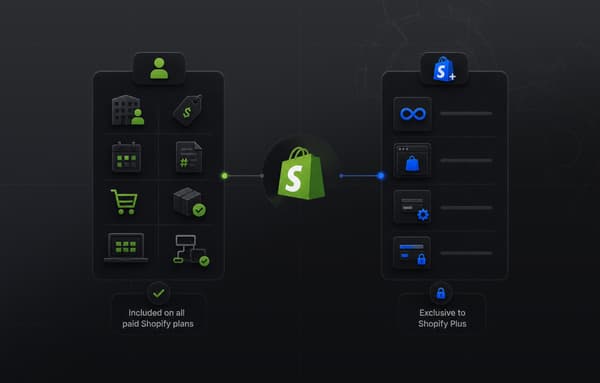
Shopify Plus includes native B2B as part of the platform:
Company accounts and locations: Multiple buyer contacts per company, each with their own role (Ordering Only, Location Admin, Admin). Manages purchasing authority at the account level.
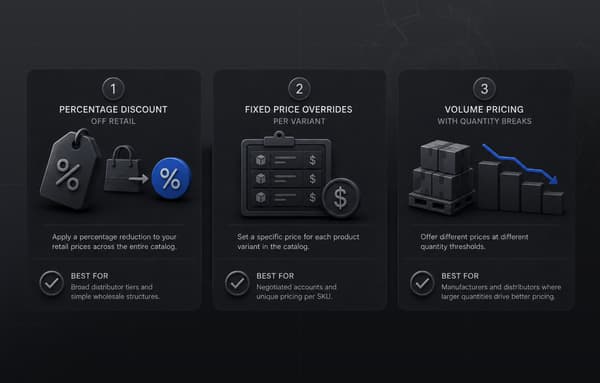
Customer-specific price lists: Assign one or more price lists per company with fixed prices or percentage adjustments off the catalog. No pricing plugin required.
Net payment terms: Native Net 30, Net 60, Net 90 configuration per company account. Buyers can place orders on terms without calling your sales team.
Vaulted payment methods: Buyers can save payment methods to their company account for reuse on repeat orders.
Quantity rules and order minimums: Set minimum order quantities, case pack sizes, and increment rules at the variant level per customer price list.
For B2B merchants on WooCommerce, migrating to Shopify Plus removes a 5-10 plugin stack and replaces it with native platform functionality that does not conflict with other apps and does not break on platform updates. Distributors leaving a heavier Symfony-based commerce stack weigh the same tradeoffs, which we cover in what B2B distributors need to know about moving off OroCommerce.
For a deeper look at configuring Shopify Plus B2B features post-migration, see Shopify B2B Wholesale Setup: Catalogs, Pricing, Permissions, and Net Terms.
5. Checkout Customization Becomes Stable
WooCommerce checkout customization uses PHP hooks: woocommerce_before_checkout_form, woocommerce_checkout_fields, and similar. These work until WooCommerce releases a major version update, at which point they often need rebuilding. Custom checkout PHP also creates security surface and testing complexity.
Shopify Plus checkout customization uses Checkout UI Extensions (React components deployed via Shopify CLI) and Shopify Functions (WebAssembly modules for payment customization, discount logic, and cart transformation). These are versioned APIs with documented deprecation cycles. They do not break on Shopify platform updates. Shop Pay, Shopify's accelerated checkout (used by 150+ million buyers), works natively with all Checkout UI Extensions.
For B2B specifically, Shopify Functions enable PO number capture at checkout, approval workflow logic, net-terms payment options per company, and custom shipping rule logic based on buyer company attributes without fragile plugin stack customization.
6. ERP Integration Architecture Becomes Reliable
WooCommerce ERP integrations typically run through plugin-based connectors (NetSuite, SAP, Dynamics) that are maintained by third parties and dependent on WooCommerce's webhook and REST API infrastructure. Plugin-based ERP connectors break when WooCommerce updates, when the plugin developer releases an incompatible version, or when a timeout on a large product sync causes data corruption.
Shopify Plus provides a high-rate Admin API (up to 1,000 requests per minute on Shopify Plus vs 40/minute on standard Shopify), Shopify Flow for event-driven automation, and a stable webhook architecture that handles bidirectional data sync reliably. For B2B operations with large catalogs, high order volumes, and complex pricing data, the API rate limits alone justify the platform migration.
Uncap Connect integrates Shopify Plus bidirectionally with NetSuite, SAP S/4HANA, Microsoft Dynamics 365, Epicor, and Infor. The integration handles product and inventory sync, order write-back, pricing list sync, and customer account data. For merchants migrating from WooCommerce who already have a WooCommerce-to-ERP connector, we rebuild the integration architecture on Shopify Plus's more reliable API infrastructure as part of the migration project.
7. Platform Updates Do Not Break Your Store
WordPress and WooCommerce release major version updates that require compatibility testing across your full plugin stack. Each major update is a potential site-breaking event that requires developer review, plugin updates, and testing. On a 40-plugin stack, major WooCommerce updates typically require 20-40 hours of developer time.
Shopify handles platform updates, including infrastructure updates, security patches, and feature releases. Theme and app updates are staged and rollback-capable. Shopify's Breaking Change Policy gives merchants a minimum 12 months' notice before any API deprecation, and provides migration paths for all deprecated functionality. Major Shopify platform changes (the move from checkout.liquid to Checkout Extensibility, the move from Shopify Scripts to Shopify Functions in June 2026) include long-running migration support from Shopify's team.
What Data Migrates from WooCommerce to Shopify Plus
A complete WooCommerce to Shopify Plus migration moves the following data types:
Products and catalog: Product titles, descriptions, SKUs, images, pricing, inventory levels, product variants (note: Shopify supports 3 option dimensions; WooCommerce products with more than 3 option dimensions require consolidation or metafield mapping), product collections from WooCommerce categories, and product metafields from WooCommerce custom fields and Advanced Custom Fields (ACF).
Customers: Customer profiles, email addresses, shipping addresses, billing addresses, customer tags, and purchase history. Note: WooCommerce password hashes cannot migrate to Shopify; customers will receive a password reset email on first login.
Orders: Complete order history including order status, line items, fulfillment status, payment method (non-card data only), and shipping details. Historical orders are typically migrated for reporting continuity; active orders are migrated with status flags.
Coupons and discounts: Active coupon codes migrate with limitations. WooCommerce coupon logic that has no Shopify equivalent (exclude sale items, exclude specific categories without explicit inclusion lists) requires manual recreation in Shopify.
SEO metadata: Product and collection meta titles, meta descriptions, and alt tags. URL structures change (WooCommerce uses /product/slug; Shopify uses /products/slug) and require a full 301 redirect map.
Blog content: WordPress blog posts and pages migrate to Shopify's built-in blog system. WordPress custom post types require mapping to Shopify metaobjects.
B2B data: For merchants migrating existing B2B operations, company accounts, customer-specific pricing assignments, and net terms configurations are rebuilt on Shopify Plus's native B2B feature set during migration. This is not a direct data migration but a configuration rebuild.
How to Migrate from WooCommerce to Shopify Plus: Step-by-Step
A professional WooCommerce to Shopify Plus migration follows these phases. The exact sequence varies by store complexity.
Phase 1: Discovery and Audit (Weeks 1-2)
Before any data moves, a thorough discovery covers: full inventory of active plugins and their functionality (typically 20-50 for a mature WooCommerce store), custom theme features and template overrides, ERP and third-party integrations, URL structure and SEO authority pages, current site performance metrics (Core Web Vitals, Lighthouse scores), and current organic ranking positions for priority pages.
This phase produces the migration scope: a plugin-to-Shopify-feature translation matrix, a custom development requirements list, a URL redirect map structure, and an integration rebuild plan.
Phase 2: Shopify Plus Environment Setup (Weeks 2-3)
Activate Shopify Plus. Configure the basic store settings: shipping zones, payment providers, tax rules, and notification templates. Set up the Shopify theme (either a Shopify-native theme or a custom design built during migration).
For B2B migrations: configure company account structure, create initial price lists, configure net payment terms, and set up buyer role permissions before importing customer data.
Phase 3: Data Migration (Weeks 3-8)
Migrate data in this order: products and collections first (largest data set, longest import time), then customers, then historical orders, then redirects, then blog content.
Tools used for WooCommerce data export: WooCommerce's native export (limited), the Matrixify app (direct WooCommerce API connection, handles metafields and custom post types), or Shopify's Store Migration app (Shopify's first-party import tool, recommended for standard catalogs).
WooCommerce-specific data migration considerations: WooCommerce custom fields (ACF, custom post types) map to Shopify metafields or metaobjects. WooCommerce product variant structures with more than 3 options require consolidation. WooCommerce customer roles migrate to Shopify customer tags (there are no customer roles in standard Shopify; Shopify Plus B2B uses company account roles for B2B buyers).
Phase 4: Custom Development and Integration Rebuild (Weeks 4-12)
Custom WooCommerce functionality that has no Shopify equivalent requires rebuilding. Common items: custom checkout fields (rebuilt as Checkout UI Extensions), custom pricing rules (rebuilt as Shopify Functions Discount Functions or Cart Transform), subscription billing logic (rebuilt with Recharge or Shopify Subscriptions), ERP integration (rebuilt using Shopify Admin API and Shopify Flow, or via Uncap Connect).
For Shopify Plus B2B: custom net terms display at checkout, PO number capture field, approval workflow notification logic, and company-specific shipping rules are all configured using Checkout UI Extensions and Shopify Functions during this phase.
Phase 5: SEO and Redirect Implementation (Weeks 6-10)
SEO preservation is one of the highest-risk aspects of a WooCommerce migration. The steps are:
First, build a complete URL redirect map. Every product URL (/product/slug in WooCommerce to /products/slug in Shopify), collection URL (/product-category/slug to /collections/slug), blog post URL, and custom page URL requires a 301 redirect. WordPress permalink structures vary; the redirect map must be built against your actual URL patterns, not a generic template.
Second, migrate all metadata. Product meta titles, meta descriptions, and alt tags must be transferred to Shopify metafields explicitly; they do not migrate automatically via product data import.
Third, validate with Google Search Console. Monitor for 404 errors and ranking changes weekly for 90 days post-launch. Any ranking drops that correlate with specific URL patterns indicate missing or incorrect redirects.
Fourth, maintain the XML sitemap. Shopify generates a sitemap automatically at /sitemap.xml. Submit it to Search Console on launch day.
Phase 6: Quality Assurance (Weeks 10-12)
QA covers: all product pages render correctly with correct pricing and variants, checkout flow completes end-to-end including payment, B2B checkout flows work correctly for company account buyers (price lists display, net terms available, PO number field present), all third-party app integrations work (email, reviews, loyalty), ERP integration sends and receives data correctly, all 301 redirects return the correct destination, page load performance meets target (under 2.5s LCP), mobile checkout completes without errors.
Phase 7: Launch and Post-Launch Monitoring (Week 12+)
On launch day: put WooCommerce in maintenance mode, run a final incremental data sync for orders and customers created since the last migration run, switch DNS to Shopify, verify all redirects are live, submit updated sitemap to Search Console, and monitor the Shopify admin for order processing issues.
Post-launch monitoring period: monitor Search Console crawl errors and ranking changes daily for 30 days, then weekly for 60 days. Monitor Core Web Vitals via Search Console. Monitor ERP integration sync logs daily for 30 days.
Migration Timeline and Cost
Timeline and cost depend on store complexity. Here is a realistic framework for WooCommerce to Shopify Plus migrations in 2026:
Standard Migration
Store Complexity: Under 1,000 SKUs, under 20 plugins, no ERP
Timeline: 8-12 weeks
Typical Cost Range: $25,000-$60,000
Mid-Complexity Migration
Store Complexity: 1,000-10,000 SKUs, 20-40 plugins, basic integrations
Timeline: 12-18 weeks
Typical Cost Range: $60,000-$120,000
Complex B2B Migration
Store Complexity: Any size, B2B feature rebuild, ERP integration
Timeline: 16-24 weeks
Typical Cost Range: $100,000-$200,000+
Enterprise Migration
Store Complexity: Multi-store, punchout, complex pricing, full ERP
Timeline: 20-32 weeks
Typical Cost Range: $200,000+
These ranges cover project scoping, data migration, custom development (checkout customization, Shopify Functions, app integrations), SEO preservation, QA, and post-launch support for 30-90 days. ERP integration (via Uncap Connect or a custom build) adds $30,000-$80,000 depending on system and data complexity.
The plugin stack audit is the largest variable. A WooCommerce store with 40 active plugins will typically need: 60% replaced by Shopify-native features or direct app equivalents at no custom development cost, 30% replaced by Shopify apps with configuration work but no custom code, and 10% rebuilt as custom Shopify app development, Checkout UI Extensions, or Shopify Functions. The 10% custom rebuild is where most of the development cost concentrates.
How to Choose a WooCommerce to Shopify Plus Migration Partner
Not every Shopify agency has done a WooCommerce migration. The specific challenges of WooCommerce migrations, including inconsistent data exports, plugin-dependent functionality that must be rebuilt, WordPress custom post types, and ACF metafields, are different from building a net-new Shopify store. Ask prospective migration partners these questions:
How many WooCommerce to Shopify Plus migrations have you completed in the last 24 months? Can you walk me through your plugin-to-Shopify translation process?
How do you handle WooCommerce custom post types and ACF fields? (The right answer: they map to Shopify metafields and metaobjects; any partner unfamiliar with this approach has not done complex WooCommerce migrations.)
How do you build and validate the URL redirect map? (The right answer: a complete audit of all URL patterns, including product, collection, blog, and custom post types, with post-launch Search Console monitoring for 90 days.)
For B2B migrations: Have you migrated B2B operations from WooCommerce to Shopify Plus B2B? How did you handle the transition from a WooCommerce plugin-based pricing stack to Shopify Plus native price lists and company accounts?
What is your ERP integration approach for Shopify Plus? (If applicable to your store.)
Verify Shopify Partner or Shopify Plus Partner status in the Shopify Partner Directory. For complex B2B migrations with ERP integration, a Shopify Platinum Partner provides the highest level of platform expertise and direct Shopify support access during migration.
For more on evaluating Shopify Plus agencies and consultants, see our guide to hiring the best Shopify consultant for your project.
For a broader view of what to expect from a Shopify Plus B2B implementation post-migration, see Best Practices for B2B Ecommerce Sales on Shopify Plus.
Ready to Migrate from WooCommerce to Shopify Plus?
Uncap is a Shopify Platinum Partner with 380+ B2B and B2C implementations since 2013. We have migrated manufacturers, distributors, and mid-market merchants from WooCommerce to Shopify Plus, including full ERP integration rebuilds via Uncap Connect and Shopify Plus B2B configuration for wholesale and B2B buyer portals.
If you are evaluating a WooCommerce to Shopify Plus migration and want a scope estimate based on your current stack, a strategy session with our team takes about 45 minutes and covers your plugin stack, B2B requirements, ERP integration, and migration timeline.WooCommerce vs Shopify Plus: Feature Comparison
Frequently asked questions
Can you migrate from WooCommerce to Shopify?
Yes. WooCommerce stores can migrate to both standard Shopify and Shopify Plus. Shopify provides a first-party Store Migration app that handles basic product imports. For complete migrations including customers, orders, blog content, custom fields, SEO metadata, and third-party integrations, a professional migration project with a Shopify Plus Partner is typically required. The migration complexity depends on catalog size, plugin count, customization depth, and whether B2B features or ERP integration are involved.
Why is Shopify better than WooCommerce for growing merchants?
The primary advantages are total cost of ownership, platform reliability, and B2B native capability. WooCommerce's self-hosted architecture requires ongoing hosting, security, and plugin maintenance that compounds in cost and risk as stores scale. Shopify's SaaS model includes infrastructure, security, and PCI compliance. Shopify Plus adds native B2B features (company accounts, price lists, net terms) that replace a fragile WooCommerce plugin stack, and a high-rate API for ERP integration that WooCommerce cannot reliably match.
Is Shopify still worth it in 2026?
Yes, particularly for merchants above $1M GMV, B2B merchants, and merchants scaling internationally. Shopify's 2024-2026 product releases have focused on the areas where WooCommerce was previously stronger: native B2B, Checkout Extensibility replacing checkout.liquid, Shopify Functions replacing Shopify Scripts (June 2026), and expanded ERP/API rate limits for enterprise merchants. The platform continues to improve for the merchant categories for which it is best suited.
How long does a WooCommerce to Shopify Plus migration take?
Timeline depends on complexity. A standard migration (under 1,000 SKUs, under 20 plugins, no ERP) typically takes 8-12 weeks. Plugin-heavy stores, larger catalogs, B2B feature rebuilds, or ERP integration add 4-12 weeks per major complexity layer. Total timelines for complex B2B migrations with ERP integration run 16-24 weeks. Any agency quoting a significantly shorter timeline for a complex scope is either skipping steps or planning to deliver an incomplete build.
How much does a WooCommerce to Shopify Plus migration cost?
Professional WooCommerce to Shopify Plus migration costs range from $25,000 for a standard store (under 1,000 SKUs, limited custom development) to $200,000+ for enterprise B2B migrations with ERP integration, Shopify Functions custom logic, and multi-store architecture. Most mid-market migrations ($2M-$10M GMV merchant) run $60,000-$150,000. ERP integration adds $30,000-$80,000 on top of the base migration cost.
Will migrating from WooCommerce to Shopify affect my SEO?
A well-executed migration preserves organic rankings through a complete URL redirect map (301 redirects from all WooCommerce URL patterns to Shopify equivalents), explicit metadata migration (meta titles, descriptions, alt tags), and post-launch Search Console monitoring. A poorly executed migration without a complete redirect map will cause ranking losses. The risk is highest for content-heavy sites with large blog archives or category page authority. All redirects should be in place on launch day, and Search Console should be monitored weekly for 90 days post-launch.
What happens to my WooCommerce B2B plugin setup when I migrate to Shopify Plus?
WooCommerce B2B plugins (Wholesale Suite, WooCommerce B2B, etc.) do not migrate to Shopify. Instead, you rebuild B2B operations using Shopify Plus's native B2B feature set: company accounts and locations replace WooCommerce customer roles, customer-specific price lists replace WooCommerce tiered pricing plugins, and native net payment terms replace WooCommerce invoice plugins. This is not a data migration; it is a configuration rebuild. The outcome is a more reliable B2B operation that does not depend on a third-party plugin stack.
Can I keep my WooCommerce store running while migrating to Shopify Plus?
Yes. The standard approach is to build and configure the Shopify Plus store in parallel while keeping WooCommerce live. Data is migrated in batches, with a final incremental sync on launch day to capture orders and customers created since the previous migration run. The switchover (DNS update) happens in a maintenance window, typically 2-4 hours. With a complete redirect map in place, customers and search engines are redirected to the correct Shopify pages immediately after switchover.
Do WooCommerce discount codes and coupons migrate to Shopify?
Most WooCommerce coupon codes migrate to Shopify Discounts with standard discount logic. WooCommerce-specific coupon behaviors that have no Shopify equivalent require rebuilding: "exclude sale items" logic (Shopify does not support this natively), "exclude categories" rules (must be converted to explicit product inclusion lists), and free shipping combined with percentage discounts (these are separate discount types in Shopify and must be configured as combined discounts). A complete coupon audit during discovery identifies which codes require manual recreation.
What is the Shopify Store Migration app and should I use it?
Shopify's Store Migration app is Shopify's first-party import tool, available free from the Shopify App Store. It handles basic product imports from WooCommerce and is suitable for simple stores with standard catalog data. It does not handle complex custom post types, ACF metafields, WooCommerce B2B configurations, ERP integration data, or complete order history migration with full fidelity. For stores above 1,000 SKUs, complex plugins, or B2B operations, a professional migration project using the Matrixify app or a custom migration pipeline produces more reliable results.