B2B pricing is the single lever most manufacturers and distributors underinvest in. Get it right and you protect margin, reward your best accounts, and make the buying experience seamless. Get it wrong and you leave revenue on the table, create inconsistency across channels, and frustrate procurement teams who cannot get a straight answer on what they actually pay.
This guide covers every major B2B ecommerce pricing strategy, how they differ from consumer pricing, how to implement them on Shopify B2B specifically, and how to architect the ERP-to-portal pricing flow that most companies get wrong the first time.
Quick Reference: B2B Ecommerce Pricing Strategies at a Glance
Customer-Segment (Tiered) Pricing
How It Works: Different prices per buyer group based on volume, type, or relationship
Best For: Distributors, wholesalers with multiple account types
Shopify B2B Implementation: Catalogs assigned to company locations
Contract Pricing
How It Works: Agreed fixed prices specific to one account
Best For: Key accounts, long-term supplier agreements
Shopify B2B Implementation: Price lists within catalogs per company
Volume (Quantity-Break) Pricing
How It Works: Unit price drops as order quantity increases
Best For: Manufacturers selling bulk orders
Shopify B2B Implementation: Quantity rules and volume pricing native in Shopify B2B
Cost-Plus Pricing
How It Works: Base cost + fixed markup; the pricing floor
Best For: Commodity products, simple supply chains
Shopify B2B Implementation: ERP-sourced list prices pushed to Shopify
Value-Based Pricing
How It Works: Price tied to outcome the product delivers
Best For: Complex solutions, differentiated products
Shopify B2B Implementation: Customer-specific catalog with fixed-price overrides
Dynamic Pricing
How It Works: Prices adjust based on real-time inputs (inventory, demand, market cost)
Best For: Raw-material-exposed industries, rental, commodity distribution
Shopify B2B Implementation: Shopify Functions custom logic + ERP event triggers
Quote-Based Pricing (CPQ)
How It Works: Custom quote generated for complex orders before transaction
Best For: Capital equipment, configured products, project-based buying
Shopify B2B Implementation: Shopify B2B draft orders + Uncap quote-to-cash workflow
Why B2B Pricing Is Fundamentally Different from B2C
Before covering strategies, it is worth establishing what makes B2B pricing structurally different. The table below shows the key distinctions.
Price Structure
B2C Pricing: Fixed, public, universal
B2B Pricing: Customer-specific, negotiated, gated behind login
Purchase Volume
B2C Pricing: Individual units
B2B Pricing: Bulk orders, recurring commitments
Contract Length
B2C Pricing: One-off transactions
B2B Pricing: Multi-month or multi-year agreements
Price Discovery
B2C Pricing: Visible on shelf or website
B2B Pricing: RFQ, login-gated portal, or direct negotiation
Payment Terms
B2C Pricing: Payment at checkout
B2B Pricing: Net 15, Net 30, Net 60, Net 90
Decision-Makers
B2C Pricing: Individual consumer
B2B Pricing: Procurement, finance, operations, multiple approvers
Complexity
B2C Pricing: Standard SKUs
B2B Pricing: Configured products, bundles, service packages
The most important implication of this table is that a public-facing price list is rarely the right model for B2B. Your OEM customer, your regional distributor, and your key account buyer cannot all see the same price for the same product without compromising one of those relationships. B2B ecommerce pricing needs to be login-gated, account-specific, and sourced from the same system of record your sales team uses. This is especially true in industrial machinery and equipment, where a single account can carry dozens of negotiated line-item rates.
Payment terms are also part of the price. A customer on Net 60 terms is effectively receiving a form of credit that increases the real cost of the transaction to you. A customer paying by ACH at checkout is clearing the invoice on placement. When you architect B2B pricing, net terms belong in the pricing conversation, not just the credit department's.
The 7 B2B Ecommerce Pricing Strategies
1. Customer-Segment (Tiered) Pricing
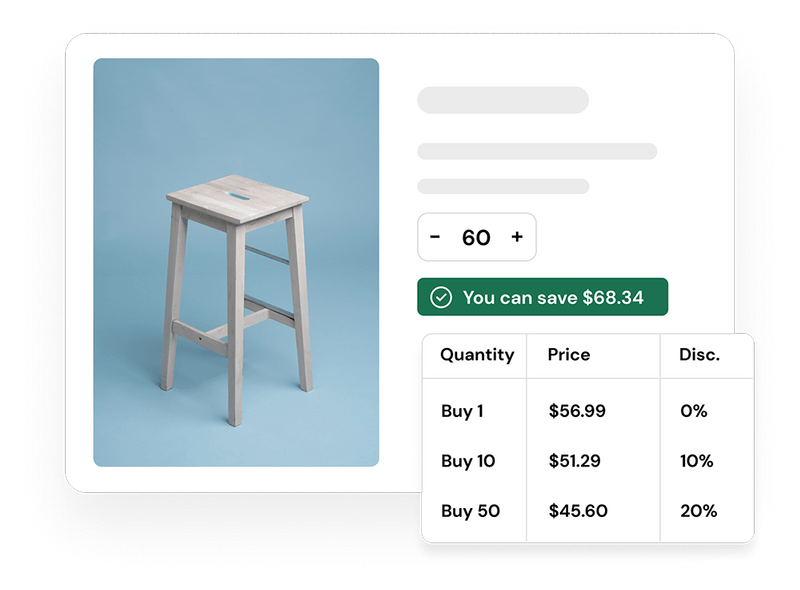
Customer-segment pricing is the dominant model in B2B because it resolves the core tension: you need pricing consistency at scale and pricing individualization at the account level simultaneously.
The model organizes buyers into tiers. Tier criteria can include order volume (a customer ordering 500 units pays less per unit than one ordering 50), buyer type (a national distributor gets different terms than a regional reseller or a direct account), geographic region, or contract status.
Why it matters: A single price list serves no one optimally. Too high and you lose price-sensitive smaller accounts. Too low and you compress margin on high-volume relationships that should be paying premium terms for premium service and volume commitments.
Common tier structures for manufacturers and distributors:
- Three tiers: list price / 20% off / 30% off, segmented by annual volume bracket
- Four tiers: retail / wholesale / distributor / key account, segmented by buyer type
- Matrix pricing: price varies simultaneously by buyer type AND order volume, creating a pricing grid
The paradox of choice applies here. Most B2B organizations that run tiered pricing effectively use three to five tiers. More than that and the model becomes confusing for buyers and difficult to manage internally.
Shopify B2B implementation: Catalogs are the native mechanism for customer-segment pricing on Shopify B2B. A catalog defines which products a buyer sees and at what price. You can set catalog prices as percentage off retail, price multipliers, or fixed prices per SKU. Each company location in Shopify B2B is assigned a catalog. When the buyer logs in, the storefront and checkout display their catalog prices automatically.
As of April 2026, Shopify B2B supports up to three active catalogs on all paid plans, and unlimited catalogs on Shopify Plus. For operations with more than three distinct pricing segments, Shopify Plus is the required tier.
2. Contract Pricing
Contract pricing assigns fixed prices or specific discount structures to a single account, reflecting the terms of a negotiated commercial relationship. A key account under a three-year supply agreement does not pay tiered pricing. They pay the price agreed in the contract, regardless of order volume in any given month.
Contract pricing is what separates a buyer portal from a simple ecommerce site. It is the mechanism that makes a B2B account want to reorder through your platform rather than spot-purchasing from an alternative supplier.
Key elements of a contract price:
- Fixed price per SKU for the contract duration
- Expiration and renewal dates that the portal enforces automatically
- Line-item exceptions where specific products are priced outside the general agreement
- Early-payment incentives that effectively lower the net price for prompt payment
Shopify B2B implementation: Within a Shopify catalog, you can set fixed prices per product or variant for the company or companies assigned to that catalog. This is the practical implementation of contract pricing: the company logs in, the catalog assigned to their company location shows their contract prices, and those prices appear at checkout without any sales rep involvement.
For operations where contract prices need to be maintained in the ERP (NetSuite, SAP, Microsoft Dynamics 365, Epicor) and pushed to Shopify, the ERP integration is what keeps contract prices current without manual updates. Uncap's ERP integration service handles this sync as a core data flow: customer-specific price lists in the ERP map to catalog assignments in Shopify, and price updates propagate automatically when contracts renew or rates change.
3. Volume (Quantity-Break) Pricing
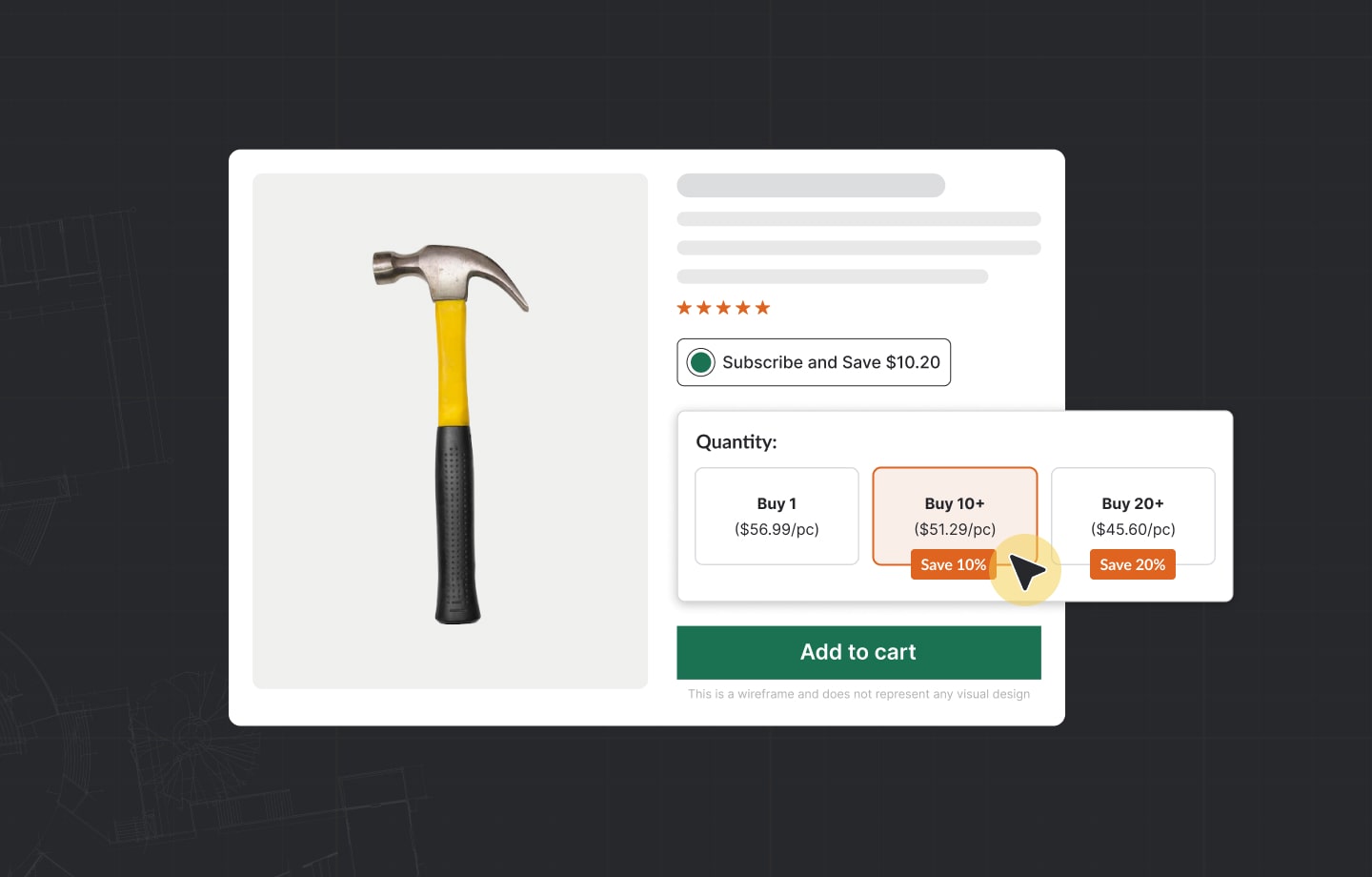
Volume pricing rewards buyers for ordering more by reducing the per-unit price as order size increases. Unlike customer-segment pricing, which varies by who the buyer is, volume pricing varies by how much they buy in a single order.
Classic structure:
1 to 99 Units
Unit Price: $12.00
100 to 499 Units
Unit Price: $10.50 (12.5% off)
500 to 999 Units
Unit Price: $9.00 (25% off)
1,000+ Units
Unit Price: $7.80 (35% off)
This structure incentivizes buyers to consolidate orders, increases average order value, and improves your demand forecasting because larger order commitments carry more predictability.
Quantity rules vs. volume pricing in Shopify B2B: Shopify B2B distinguishes between two related but separate features. Volume pricing adjusts the per-unit price based on quantity thresholds. Quantity rules set minimum order quantities (MOQ) and quantity increments independently of price. A product might require a minimum order of 12 units (sold in packs of 12), with a volume break at 60 units. Both rules can be configured per catalog, giving you precise control over how each customer segment interacts with bulk ordering.
When to use it: Volume pricing is most effective for products with meaningful per-unit cost differences at different production runs, and for distributors and wholesalers where order consolidation creates genuine operational benefit. It is less effective for configured or high-complexity products where every order is custom regardless of quantity.
4. Cost-Plus Pricing
Cost-plus pricing calculates your total cost to produce and deliver a product, then adds a fixed percentage markup. It is the pricing floor: no matter what other strategies you apply on top, the cost-plus calculation defines the minimum price at which the transaction is profitable.
Full cost base for B2B manufacturers and distributors:
- Product cost or manufactured cost (COGS)
- Inbound freight and receiving
- Warehousing and inventory carrying cost
- Outbound fulfillment and last-mile delivery
- Customer-specific support and service overhead
- Credit risk and payment term cost (Net 60 has a real cash cost)
- Returns, warranty, and claims
- Overhead allocation
The most common cost-plus pricing failure is using only direct product cost and ignoring the downstream cost of serving each customer. A small account ordering 10 items with frequent returns and phone support may generate lower margin than their purchase price suggests. Activity-based costing (ABC) at the customer or customer-type level reveals the true profitability picture.
Shopify B2B implementation: ERP systems are the home of cost-plus pricing calculations. Your ERP maintains the cost records, applies the markup rules, and outputs list prices. These list prices feed to Shopify as the baseline catalog price. Customer-specific discounts, tiered breaks, and contract overrides then apply on top of that list price. The ERP is the source of truth for the floor; Shopify is the delivery mechanism to the buyer.
5. Value-Based Pricing
Value-based pricing ties the price to the outcome the product delivers for the buyer, not to the cost of producing it. A fastener that prevents a $50,000 production line shutdown is worth significantly more than a cost-plus calculation would suggest. Value-based pricing captures that.
It is the most intellectually demanding strategy to implement because it requires understanding the buyer's business, not just your own cost structure. The practical inputs for a value-based price are: what problem does this product solve, what is the buyer's next-best alternative, what cost does using this product eliminate or reduce, and what risk does it mitigate?
When value-based pricing applies in manufacturing and distribution:
- Proprietary or differentiated products where alternatives are meaningfully inferior or more expensive
- Engineered-to-specification products where the switching cost is high
- Products with strong outcome data (proven yield improvement, documented failure rate reduction)
- After-market and service contracts where you control the support relationship
The research requirement: Setting value-based prices requires direct conversation with buyers. Win/loss data from the sales team, post-purchase surveys, and account review conversations are the data sources. Analytics platforms can surface price-sensitivity patterns across segments once you have enough transaction data.
Shopify B2B implementation: Value-based prices are expressed in the catalog as fixed prices per product variant, independent of the list price. A key account for which your product delivers disproportionate value has a catalog with prices reflecting that value, separate from your volume-tiered catalog for distributors. The platform itself is agnostic to the pricing philosophy behind the number.
6. Dynamic Pricing
Dynamic pricing adjusts prices in response to real-time signals: inventory levels, demand fluctuations, raw material costs, competitor moves, or seasonal patterns. It is the most technically demanding strategy to implement and the most powerful in industries where input costs or supply availability shifts frequently.
Industries where dynamic pricing is essential for B2B:
- Chemicals and petrochemicals: raw material costs change weekly or daily based on commodity indices
- Steel and metals distribution: mill prices move with spot markets
- Equipment rental: pricing reflects availability by location and project duration
- Building materials: demand and supply seasonality create meaningful pricing windows
- Consumable distribution: inventory pressure and expiration dates warrant dynamic adjustment
The trust concern with dynamic pricing: Buyers who see prices change unexpectedly lose confidence in the commercial relationship. The answer is transparency: if prices move because input costs changed, say so. If a price increases because available stock is limited, make that visible. Dynamic pricing that explains its logic builds trust; dynamic pricing that appears arbitrary destroys it.
Shopify B2B implementation: Dynamic pricing on Shopify Plus uses two mechanisms. First, Shopify Functions allows custom pricing logic to be built directly into the checkout. A Function can apply a surcharge when a raw material index exceeds a threshold, remove a discount when inventory falls below a quantity, or calculate a project-specific price based on parameters entered by the buyer. Second, ERP integration enables event-driven pricing: when the ERP recalculates prices based on updated input costs, the updated prices push to Shopify catalog price lists automatically, without manual republishing.
Note that Shopify Scripts, the older mechanism for custom checkout logic, reached end-of-life in June 2026. Any Shopify Plus store using Scripts for pricing logic must migrate to Shopify Functions.
7. Quote-Based Pricing (CPQ: Configure, Price, Quote)
For complex products, high-value capital equipment, or project-based orders, a firm price cannot be published in a catalog because the price depends on configuration, project scope, lead time, and negotiated terms. The correct model is a quote workflow: the buyer submits a request, the seller generates a quote, the buyer accepts it, and the order is placed.
CPQ (configure, price, quote) is the workflow that manages this process. In B2B ecommerce, an effective CPQ workflow handles the full sequence digitally: product configuration, price calculation, quote generation, buyer review, approval routing, and order conversion.
When quote-based pricing is the right model:
- Capital equipment with project-specific configurations (dimensions, materials, certifications)
- Custom formulations or batch specifications in chemical and specialty manufacturing
- Complex bundles where the final price depends on component combinations
- Strategic account bids where the price is tied to volume commitments not yet confirmed
Shopify B2B implementation: Shopify supports quote-based workflows through draft orders. A sales rep or buyer initiates a draft order, pricing is applied manually or via ERP quote sync, the buyer reviews and approves, and the draft converts to an active order. Uncap's B2B app suite extends this with a native quote request flow built on top of Shopify's draft order infrastructure, covering quote requests from the buyer portal, sales rep assignment, pricing and negotiation, approval routing, and order conversion without leaving the Shopify admin.
How to Implement B2B Pricing on Shopify: Architecture Overview
Getting B2B pricing right on Shopify requires correct architectural decisions before you start configuring catalogs. These are the five decisions that determine whether your pricing system works at scale.
Decision 1: ERP as Source of Truth vs. Shopify as Source of Truth
For manufacturers and distributors with established customer pricing in an ERP (NetSuite, SAP, Microsoft Dynamics 365, Epicor, Sage, Acumatica), the ERP should remain the source of truth for prices. Shopify catalogs receive prices from the ERP via integration. Price updates happen in the ERP and propagate to Shopify, not the reverse.
Attempting to maintain pricing in Shopify independently of the ERP creates reconciliation problems: sales reps quoting from ERP data, buyers ordering at different prices via the portal, and invoice mismatches that the operations team must resolve manually.
Decision 2: How Many Pricing Tiers You Actually Need
Most B2B operations can be expressed in three to six pricing tiers before the model becomes unmanageable. Audit your current customer base and map how many genuinely distinct pricing structures exist. A distributor that has 50 accounts but only three meaningfully different pricing structures needs three catalogs, not 50.
Reserve fixed-price-per-account contract pricing for key accounts where the individual terms are distinct enough to justify a dedicated catalog. For the rest, group pricing using a tier catalog handles the requirement.
Decision 3: Where Discounts Live
Discounts in B2B pricing can live in three places: the catalog price (the buyer's price is already the discounted price; they never see list), the cart (a discount is applied at checkout based on conditions), or a post-purchase rebate (the buyer pays list and receives a credit retroactively based on quarterly volume).
Each mechanism has different implications for how the buyer perceives value, how you report margin, and how the ERP reconciles revenue. Decide where discounts live before you configure Shopify, because switching mechanisms later requires re-architecting how catalogs, checkout, and ERP data interact.
Decision 4: Whether to Show Pricing Before Login
The standard B2B architecture is to show base or "request pricing" messaging to unauthenticated visitors, and show account-specific prices only after login. This protects negotiated terms from competitive exposure and is the correct approach for most manufacturers and distributors.
Some operations benefit from transparent base pricing visible without login, particularly when the goal is attracting new wholesale accounts via SEO. In this case, show your highest-tier (list) price publicly, and let authenticated buyers discover their discount upon login.
Decision 5: Payment Terms as a Pricing Component
Net payment terms are not just a credit decision. They are a pricing component. A customer on Net 90 terms has 90 days of float on every order, which has a real cost to your operation that should be priced into the account. Build payment term assignments into the same workflow as catalog assignments: every company location in Shopify B2B gets both a catalog and payment terms configured simultaneously.
Shopify B2B supports Net 15, Net 30, Net 60, and Net 90 natively. Partial payments and deposits are available on Shopify Plus. ACH payments (US merchants) are available on all paid plans.
In healthcare distribution, this plays out as managing GPO pricing tiers across health system networks, where each network enforces its own contracted rates.
B2B Pricing Architecture for Manufacturers and Distributors: The ERP Integration
For manufacturers and distributors, pricing is not a marketing decision. It is an operational one, owned by the pricing department or commercial leadership and enforced by the ERP. The Shopify implementation needs to reflect this.
The correct B2B pricing data flow:
- Customer master data maintained in the ERP (account type, tier, region, contract status)
- Pricing rules and price lists maintained in the ERP (cost-plus floors, tiered schedules, contract overrides)
- ERP pushes customer-specific prices to Shopify catalog via integration (real-time or scheduled batch, depending on pricing change frequency)
- Company accounts in Shopify B2B are mapped to their corresponding ERP customer records
- Company locations are assigned the catalog that reflects their ERP pricing tier
- Orders placed in Shopify sync back to the ERP for fulfillment, invoicing, and accounts receivable
This flow eliminates the largest source of B2B ecommerce pricing failure: prices on the portal that do not match prices on the invoice, because they were maintained independently.
ERP integration data flows for pricing:
Customer-Specific Price Lists
Direction: ERP to Shopify
Frequency: Real-time or daily batch
Standard Tier Prices
Direction: ERP to Shopify
Frequency: On update (product or price change)
Contract Price Updates
Direction: ERP to Shopify
Frequency: On contract renewal or amendment
New Customer Account Creation
Direction: ERP to Shopify
Frequency: Real-time (triggers catalog assignment)
Order Export for Fulfillment
Direction: Shopify to ERP
Frequency: Real-time on order placement
Payment Term Updates
Direction: ERP to Shopify
Frequency: On credit review cycle
Uncap's Uncap Connect service handles this integration for Shopify Plus connected to NetSuite, SAP, Microsoft Dynamics 365, and Epicor, with native ERP connectors that sync all six of the above data flows without custom middleware.
Common B2B Pricing Mistakes to Avoid
Maintaining pricing in spreadsheets alongside a live portal. When sales reps quote from one price source and buyers order from another, invoice disputes become a routine operational cost. The ERP must be the single source of truth for pricing data.
Too many discount exceptions without governance. When every sales rep can override pricing without documented approval, the nominal pricing structure becomes meaningless. Define discount authority by role (who approves a 5% exception vs. a 15% exception) and enforce it through approval workflows.
Showing the same price to every buyer. If your portal shows a single price to authenticated users regardless of their account tier, you are not using B2B pricing correctly. Buyers in different tiers expect to see their negotiated prices, not a generic list price with a "call for pricing" message.
Ignoring the payment terms component. Net 60 and Net 90 terms have a real carrying cost. If you offer extended payment terms without adjusting price expectations for those accounts, you are effectively discounting without recognizing it in your margin calculation.
Treating tiered pricing and contract pricing as the same thing. A tier is a rule applied to a segment. A contract is a commitment made to a specific account. They should live in separate catalogs, because contract prices override tier prices, and mixing them in the same catalog structure creates conflicts.
Not flagging price expiration dates. If a promotional price or a fixed contract price expires and you do not update the catalog assignment, the buyer continues to receive the expired price until someone notices. Build price expiration management into the ERP-to-Shopify pricing sync.
Combining Pricing Strategies: What Works Together
No B2B operation uses a single pricing strategy in isolation. The most effective B2B pricing systems layer strategies deliberately.
For manufacturers with direct accounts and a distributor network:
- Cost-plus floor maintained in the ERP for all SKUs
- Volume pricing tiers applied via Shopify B2B catalogs for distributor segments
- Contract pricing via dedicated catalogs for key accounts
- Quote workflow via draft orders for custom or project-specific orders
For distributors with high SKU count and diverse buyer types:
- Customer-segment catalogs for three to four buyer tiers (retail, wholesale, dealer, key account)
- Volume quantity breaks within each catalog for bulk order incentives
- Dynamic pricing on high-demand or raw-material-exposed SKUs via Shopify Functions
- Net payment terms assigned per account based on credit tier
For wholesalers running unified B2B and DTC:
- Public catalog shows retail prices (unauthenticated visitors)
- Wholesale catalog assigned to B2B company accounts shows wholesale prices at login
- Volume breaks within the wholesale catalog for high-volume accounts
- Key account catalogs for top 5 to 10 accounts with individually negotiated prices
Pricing on Shopify B2B: Feature Reference (2026)
The 2026 update to Shopify B2B expanded native pricing features to all paid plans. Here is the current state by plan.
Company-Specific Catalogs
Basic: Up to 3
Shopify: Up to 3
Advanced: Up to 3
Plus: Unlimited
Fixed Prices per Product per Catalog
Basic: Yes
Shopify: Yes
Advanced: Yes
Plus: Yes
Percentage-Off Pricing per Catalog
Basic: Yes
Shopify: Yes
Advanced: Yes
Plus: Yes
Volume Pricing (Quantity Breaks)
Basic: Yes
Shopify: Yes
Advanced: Yes
Plus: Yes
Quantity Rules (MOQ, Increments)
Basic: Yes
Shopify: Yes
Advanced: Yes
Plus: Yes
Net Payment Terms (15/30/60/90)
Basic: Yes
Shopify: Yes
Advanced: Yes
Plus: Yes
ACH Payments (US)
Basic: Yes
Shopify: Yes
Advanced: Yes
Plus: Yes
Partial Payments and Deposits
Basic: No
Shopify: No
Advanced: No
Plus: Yes
Shopify Functions for Custom Checkout Pricing
Basic: No
Shopify: No
Advanced: No
Plus: Yes
Direct Catalog-to-Company Assignment
Basic: No
Shopify: No
Advanced: No
Plus: Yes
Shopify Flow B2B Automation
Basic: Yes
Shopify: Yes
Advanced: Yes
Plus: Yes
For manufacturers and distributors with more than three pricing tiers or contract-specific pricing for individual accounts, Shopify Plus is required. For most mid-market wholesale operations with three or fewer pricing tiers and standard net terms, the Advanced plan covers the full requirement.
What This Means for Your Platform Decision
The pricing capabilities that were exclusive to Shopify Plus through 2025 are now available on all plans for the foundational use cases. A manufacturer or distributor that needs company accounts, three pricing tiers, volume breaks, and net payment terms can run that operation on Shopify Advanced at $399/month.
The cases that require Shopify Plus ($2,300/month on a 3-year contract):
- More than three distinct pricing catalogs
- Individual contract pricing per key account at scale
- Partial payments and deposits at checkout
- Shopify Functions for custom pricing logic at checkout
- Unlimited company account management at enterprise scale
Uncap has delivered over 380 B2B implementations on Shopify Plus since 2013 and is a Shopify Platinum Partner. Our practice is specifically built for manufacturers, distributors, and wholesalers where pricing architecture complexity is high. We scope the catalog structure, design the ERP pricing integration, and build the quote-to-cash workflow before any development begins, because getting the pricing architecture right before going live is always cheaper than fixing it after. Much of this work involves migrating off Magento, where years of custom pricing modules have to be rebuilt as clean catalog logic.
If you are evaluating how to structure B2B pricing on Shopify, or migrating from a legacy ERP portal or wholesale channel where pricing management has become unmanageable, Book a Strategy Session and we will walk through your specific requirements.
Continue Reading
- Shopify B2B Wholesale for Suppliers: The Complete 2026 Guide
- 3 Ways to Run Wholesale on Shopify in 2026
- The Anatomy of a Private Order Portal on Shopify Plus
- Shopify B2B Wholesale Setup: Catalogs, Pricing, Permissions, and Net Terms
- Ecommerce for Distributors: Going Online with Shopify Plus
Frequently asked questions
What is the best B2B pricing strategy?
There is no universally best B2B pricing strategy. Most mature operations use a layered approach: cost-plus as the floor to protect margin, customer-segment (tiered) pricing as the primary model for the majority of accounts, contract pricing for key accounts under formal agreements, and volume pricing to incentivize order consolidation. The right combination depends on the number of customer segments, the level of product differentiation, the frequency of price changes, and the complexity of the ERP pricing structure.
What is B2B customer-specific pricing?
Customer-specific pricing means each buyer sees the prices that reflect their individual negotiated terms, not a generic list price. In a Shopify B2B portal, this is implemented through catalog assignments: each company account is assigned a catalog that contains their specific prices. When a buyer from that company logs in, the storefront shows catalog prices, not public retail prices. The underlying prices typically originate in the ERP and sync to Shopify automatically.
How does tiered pricing work in B2B ecommerce?
Tiered pricing organizes buyers into groups (tiers) based on criteria such as annual purchase volume, buyer type (distributor vs. retailer vs. direct account), or contract status. Each tier has its own price schedule. On Shopify B2B, tiers are implemented as separate catalogs. A distributor catalog might apply a 25% discount off retail; a key account catalog might have individually negotiated fixed prices per SKU. Buyers in each tier see only their catalog prices when logged in.
What is dynamic pricing in B2B?
Dynamic pricing adjusts prices in response to real-time inputs including demand levels, inventory availability, raw material costs, or competitive market conditions. In B2B, it is most relevant for industries with significant input cost volatility, such as chemicals, metals, and building materials. On Shopify Plus, dynamic pricing is implemented via Shopify Functions, which allows custom pricing logic in the checkout, or via ERP-triggered catalog updates that push new prices to Shopify when underlying costs change.
How do I set up B2B pricing on Shopify?
Setting up B2B pricing on Shopify involves five steps: (1) Enable B2B in Shopify admin under Settings, then Customers. (2) Create company profiles for each wholesale account. (3) Create catalogs reflecting your pricing tiers, percentage discounts, or fixed contract prices. (4) Assign each company location to the appropriate catalog. (5) If your ERP manages customer-specific pricing, set up the ERP-to-Shopify integration so price updates propagate automatically. For operations with more than three pricing catalogs or contract pricing for individual accounts, Shopify Plus is required.
What is contract pricing in B2B?
Contract pricing assigns fixed prices or specific discount structures to a single account based on a formal commercial agreement. Unlike tiered pricing, which applies the same discount to all buyers in a group, contract pricing reflects the individual terms negotiated with a specific company. It typically has an expiration date tied to the contract term. In Shopify B2B, contract pricing is implemented as a dedicated catalog for that company, with fixed prices per product that override any general tier pricing.
How do net payment terms affect B2B pricing?
Net payment terms are part of the effective price offer in B2B. A buyer on Net 60 terms receives 60 days of float on every order, which has a carrying cost to the seller equivalent to the cost of financing that receivable for 60 days. When pricing accounts with extended terms, this carrying cost should factor into the minimum acceptable price. On Shopify B2B, net payment terms are assigned per company location and enforced at checkout: a buyer on Net 30 completes their order without entering payment details, and payment is collected 30 days later.
What is the difference between a Shopify B2B catalog and a price list?
In Shopify B2B, a catalog is the container that defines which products a buyer can see and at what prices. Within a catalog, the pricing can be set as a percentage off the retail price, a price multiplier, or fixed prices per product variant. A "price list" is not a separate Shopify feature; it refers to the set of prices within a catalog. When ERP integrations reference "syncing price lists to Shopify," they mean pushing the ERP's customer-specific pricing into Shopify catalogs. Each company location is assigned one catalog, which delivers their personalized pricing experience.
Should B2B prices be visible without login?
For most manufacturers and distributors, the correct approach is to gate customer-specific pricing behind login. Showing account-specific prices publicly exposes negotiated rates to competitors and other buyers, which can undermine relationships. The standard implementation is to show base or retail pricing to unauthenticated visitors with a "log in to see your pricing" prompt, and reveal catalog prices after authentication. Some operations display a starting-from price publicly to support SEO and new account acquisition, while reserving contracted rates for authenticated users.