B2B buyers today expect the same buying experience they get from consumer platforms. Fast, self-service, available on any device. If your Shopify storefront forces buyers to call for pricing, wait 48 hours for a quote response, or re-enter their order details on every purchase, they move on.
Shopify B2B conversion rate optimization is not the same discipline as DTC CRO. The friction points are different. The measurement is different. The tactics that work are specific to how B2B buyers actually operate: multiple stakeholders, repeat ordering, custom pricing, and longer decision cycles. A tactic that lifts DTC conversion by 20% might have no effect on a manufacturing distributor whose buyers already know what they want and just need the platform to get out of their way.
This guide covers what a good B2B conversion rate looks like on Shopify, how to build a customer journey map for multi-stakeholder buying, the native Shopify B2B features that remove the most friction, and how to measure the metrics that actually predict revenue in a B2B context. It draws on Uncap's experience building and optimizing 380-plus Shopify storefronts, many of them for manufacturers, distributors, and wholesale operators.
What Is Shopify B2B Conversion Rate Optimization?
Shopify B2B conversion rate optimization is the practice of systematically identifying and removing the friction that prevents business buyers from completing purchases on your Shopify storefront. Unlike DTC CRO, which focuses on persuading undecided visitors to make a first purchase, B2B CRO is primarily about making the buying process faster and more reliable for buyers who have already decided to work with you.
The distinction matters because it changes where you look for gains. A manufacturer's biggest CRO opportunity is rarely a button color or a hero image. It is the checkout failing to apply net terms, the catalog showing products the buyer is not authorized to purchase, or the quote workflow requiring four email exchanges to accomplish what a self-service tool could handle in two minutes.
B2B CRO on Shopify requires understanding how your specific buyers use the platform, where they drop off, and which platform features your storefront is not using that would make their workflow faster.
What Is a Good B2B Conversion Rate on Shopify?
A good B2B conversion rate on Shopify depends heavily on your buyer base, product complexity, and average order value, but the average conversion rate for Shopify stores overall is around 1.4%. For B2B specifically, a 2% conversion rate is considered solid, and anything above 2.5% is above average.
What qualifies as "good" requires more context than a single percentage point:
Average order value: A distributor with a $5,000 minimum order and a 3% conversion rate is performing well. A wholesaler selling commodity items at a $200 average order with 3% is leaving room on the table. Higher-AOV operations tolerate lower conversion rates because the revenue-per-converted-session is already high.
Buyer type and channel: Self-service storefronts where buyers browse and complete purchases independently convert differently from platforms where most orders go through a rep-assisted or quote-based workflow. A low "session conversion rate" on a platform that routes most buyers through quotes is not necessarily a problem.
Repeat vs. new buyer mix: B2B revenue is dominated by repeat orders. An account that visited your storefront fifteen times over a month before placing an order represents one conversion event, not fifteen. Session-level conversion metrics significantly understate the performance of a B2B store with a healthy repeat buyer base.
Industry context: B2B conversion rates vary by vertical. Industrial manufacturing buyers tend to have longer evaluation cycles and lower per-session rates. Food and beverage distributors buying on established schedules may convert on nearly every visit.
Setting a meaningful target requires analyzing your existing account conversion data first. Benchmarks from other businesses are useful for orientation but should not replace performance data from your own buyer base.
North Star Metrics for B2B CRO
Beyond headline conversion rate, the metrics that most reliably predict B2B revenue outcomes are:
Account conversion rate: What percentage of company accounts that visit your storefront within a 30-day window place at least one order? This is more meaningful than session-level conversion because B2B buyers research across multiple sessions before committing.
Quote-to-order conversion rate: How many quote requests turn into confirmed orders, and how long does that process take? Low conversion here points to pricing mismatches, slow response times, or workflow friction in the quoting process.
Reorder rate: What percentage of accounts place a second order within 90 days? For most B2B operations, the reorder rate is the most important CRO metric because repeat purchasing is where the majority of revenue lives.
Time-to-checkout: The elapsed time from first product page view to completed order, averaged across account sessions. Long times indicate friction in the quoting or configuration step that a self-service improvement could resolve.
Why B2B CRO Is Structurally Different from DTC
DTC conversion rate optimization is built around a single buyer making a relatively quick decision. Urgency banners, scarcity triggers, abandoned cart emails, upsell pop-ups, these tactics work because DTC purchases are largely individual, emotional, and time-compressed.
B2B buying works differently at the structural level, and this changes where the conversion leverage actually sits.
Multi-stakeholder journeys: B2B purchasing decisions involve an average of six to ten stakeholders across a buying cycle that spans weeks or months. The person who browses your catalog is often not the person who approves the purchase. CRO tactics built around persuading a single visitor to buy now are largely irrelevant when the actual decision requires internal sign-off from procurement, finance, and operations.
Account-level signals over session-level clicks: B2B buyers research across multiple sessions, revisit specific pages repeatedly, and often visit the same storefront from multiple devices. The data points that matter are at the account level: how many accounts that engage with your product catalog eventually convert, not how many sessions result in a purchase.
Repeat orders as the primary revenue driver: In DTC, customer acquisition is a constant priority. In B2B, a distributor can generate most of its revenue from the same fifty accounts year over year. The conversion event that matters most is not first purchase but second purchase, the moment a buyer decides this is their regular supplier.
Higher AOV with lower urgency: B2B purchases are typically larger and more deliberate. A buyer placing a $10,000 wholesale order will not be moved by a countdown timer. They need accurate pricing, clear specifications, and a checkout that reflects their established terms.
This means the biggest conversion levers in B2B are in the checkout, the account experience, the quoting workflow, and the reorder flow. The goal is not to persuade undecided visitors. It is to remove every obstacle between your buyer and the completed order.
For a faster rundown of the fundamentals, we also cover eight practical ways to improve B2B ecommerce conversion on Shopify.
Mapping the B2B Customer Journey on Shopify
Before optimizing specific pages or features, map how your buyers actually move through your storefront. The B2B customer journey on Shopify has distinct stages that each carry their own friction points.
Discovery and account activation: New buyers first encounter your storefront, request access or a login, and get their account configured. For gated B2B storefronts, the time between access request and first login is often where new accounts fall off. Slow account setup processes, manual approval, delayed credential delivery, incomplete catalog assignment, can kill conversion before it starts.
Catalog exploration and specification: Once logged in, buyers browse to confirm that your catalog matches their purchasing needs. Friction at this stage comes from poor search, missing specifications, incorrect product visibility, or pricing that does not reflect their negotiated rate. A buyer who cannot quickly find their specific SKUs and verify the price they were quoted is likely to call your rep instead of ordering.
Quoting and order configuration: For complex B2B operations, most orders do not go directly to checkout. They move through a quote request, a rep review, and an approval step before converting. Every handoff in this workflow is a potential drop-off point. The longer the quote cycle, the more time the buyer has to reconsider or source elsewhere.
Checkout and payment: Even buyers who have gotten to checkout sometimes abandon. The causes in B2B are distinct from DTC: payment terms not applied to their account, shipping costs that exceed expectations, minimum order thresholds they did not anticipate, or address validation errors on business addresses.
Reorder and account management: Repeat buyers need a fast path back to their last order, their saved addresses, their payment terms, and their most frequently purchased SKUs. Any friction in the reorder flow compounds across every subsequent purchase for that account.
Mapping each stage against your Shopify analytics, page views, add-to-cart events, checkout initiations, completed orders, shows which stages are leaking accounts and which are converting well.
1. Remove Friction with Shopify B2B's Native Features
The fastest path to better B2B conversion rates is giving buyers the tools to complete their own purchases without involving your sales team for every step. Shopify B2B's native features on Plus are built exactly for this.
Company profiles and multi-location account management: Organize buyers into company accounts with assigned locations, contacts, and roles. Buyers log in and see their account history, pricing, and payment terms without contacting a rep.
Customer-specific catalogs: Each company account sees only the products and SKUs relevant to their purchasing agreement. Showing a buyer products they cannot purchase, or hiding products they are authorized for, introduces confusion and drives up pre-purchase support contacts.
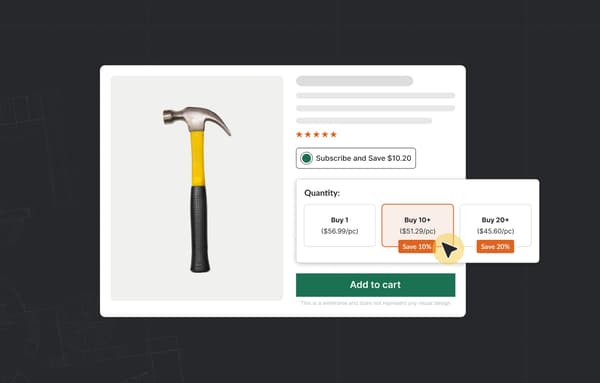
Tiered and volume pricing: Quantity break discounts and contract rates apply at checkout automatically, tied to the buyer's account configuration. The buyer never has to ask for their pricing to be honored.
Net payment terms: Configure Net 30, Net 60, Net 90, or custom terms per company account. Buyers on terms check out without friction because their payment method is already configured. Payment term mismatches at checkout are one of the most common causes of B2B cart abandonment.
Self-service reorder: Past orders are accessible and re-orderable in a few clicks. For most B2B operations, the reorder flow is where the majority of revenue actually lives. Every step removed from the reorder process increases reorder frequency.
Draft orders and order approvals: Buyers can build carts, save them as drafts, and route them for internal approval before checkout. This matches the actual workflow of procurement teams and prevents the order from disappearing while it waits for sign-off.
For Shopify B2B wholesale operators, these features shift workload from your operations team to the platform and reduce the manual touchpoints required for every transaction. Operators migrating from NetSuite commerce to Shopify feel this shift immediately, once those manual steps move onto the platform.
2. Optimize Site Speed Before Anything Else
Every second of load time delay costs you conversions. A three-second page load reduces conversion rates by more than 30% compared to a sub-one-second load. In B2B, where buyers browse large catalogs and data-heavy product pages, performance is not a secondary consideration.
Shopify's infrastructure handles speed well at the platform level. The global content delivery network ensures fast load times regardless of buyer location. But store configuration choices can undercut that infrastructure significantly.
Compress product images: Large image files are the most common performance drag on Shopify B2B storefronts. High-resolution images matter for product presentation, but they need to be delivered in modern formats at sizes appropriate to the display context. Lazy-loading product images below the fold can improve perceived load time without reducing image quality.
Audit your app stack regularly: Every third-party app installed on Shopify adds JavaScript to your storefront. Apps that are installed but underused, apps that duplicate functionality provided natively by Shopify B2B, and apps with poor code quality all add load time. A quarterly app audit that removes unused tools typically produces measurable speed improvements.
Monitor Core Web Vitals: Shopify's analytics surfaces Largest Contentful Paint, Interaction to Next Paint, and Cumulative Layout Shift. Set targets for each and track them across updates. Google's Core Web Vitals directly influence organic search rankings, which affects the quality and volume of traffic reaching your storefront.
Prioritize checkout performance on mobile: Field buyers placing orders from warehouses or job sites are often on variable mobile connections. Performance on mobile matters as much as performance on desktop, and the two require separate testing.
3. Optimize for Mobile Buyers and Field Sales Teams
B2B buyers are not always at a desk. Procurement managers approve quotes on tablets. Field sales reps place orders from a customer's location. Warehouse managers check inventory availability from their phone.
If your storefront does not perform well on mobile, you are placing conversion friction directly in front of the buyers who place the most time-sensitive orders.
Large, tappable targets on key actions: Product configuration selectors, add-to-cart buttons, and checkout actions need to be large enough to operate reliably with a finger. Small touch targets cause selection errors that interrupt the order flow.
Minimal form fields at checkout: Every additional field at checkout reduces completion rate. Use Shopify's address autofill and pre-fill account details for logged-in buyers. Company name, billing address, and shipping address should all pull from the buyer's account profile automatically.
Accelerated checkout for eligible accounts: Buyers who have Shop Pay enabled can complete purchases in seconds. For B2B accounts on credit terms, configure checkout to display only the payment methods approved for that account, which removes the confusion of seeing payment options that do not apply to their account.
Test the full mobile order workflow: Most teams test their desktop experience carefully and neglect mobile. Run a complete order simulation on mobile: log in, browse by category and search, view a product detail page, add to cart or request a quote, proceed through checkout, and confirm the order. Note every point where the workflow slows down or requires zooming, scrolling, or retrying.
Responsive theme design is table stakes. Mobile optimization for B2B means testing the actual buyer workflow on the devices your buyers actually use.
4. Build a Self-Service Quote and CPQ Workflow
Quote requests are one of the highest-friction stages in the B2B buying process. A buyer who needs to request a quote, wait for a rep to respond, and then complete a separate checkout step is at risk of dropping out at every handoff.
Configure, price, and quote (CPQ) functionality on Shopify gives buyers the ability to submit configuration requirements, receive pricing, and convert a quote to an order without a rep-mediated workflow for straightforward requests. This compresses the quote-to-order cycle from days to hours for most standard transactions.
The Uncap B2B App Suite includes quote request tools that connect to your Shopify catalog and pricing rules. Buyers submit requests from the product page, reps respond with itemized quotes, and buyers approve and convert to order within the same interface. The full quote history, communication, and order record stay connected in one place.
The practical components of a B2B quote workflow that converts:
Quote request from the product page: Buyers select quantities and variants and submit a quote request rather than adding to cart directly. This removes the "I'll email my rep" drop-off that happens when buyers encounter uncertain pricing.
Rep response within the platform: Pricing is applied based on catalog rules and any negotiated adjustments, terms are attached, and the quote is returned to the buyer's account within the platform. The response time target matters here: a same-day response keeps the buying cycle moving.
One-click order conversion: Buyers approve the quote and the order is placed without re-entry of any information. Every field the buyer has to re-enter after approving a quote is a friction point that erodes the conversion.
Full version history: Buyers and reps can see every revision to a quote without searching through email threads. Procurement managers who need to document approval history can pull the complete record from the platform.
For manufacturers with complex product configurations, guided CPQ selection workflows help buyers specify the correct product without calling for assistance, which removes the pre-purchase support touchpoint that often delays orders by days.
5. Personalization and Customer Segmentation
B2B personalization is not about showing a buyer a product banner based on their browsing history. It is about making sure every element of their Shopify experience reflects their actual account: their pricing, their catalog, their payment terms, and their order history.
Shopify B2B's company account structure supports this at the platform level. The tools and configuration that build on top of that structure determine how well the personalization actually works in practice.
Catalog segmentation by account type: Different buyer segments, distributors vs. dealers, regional accounts vs. national accounts, new accounts vs. established ones, may need different catalog views. Shopify B2B's custom catalog feature supports assigning different product sets to different company accounts.
Pricing segmentation by contract: Volume tiers, contract rates, and promotional pricing can all be configured per company account and applied automatically at checkout. A buyer who has negotiated a specific rate for a specific SKU should see that rate every time they log in, without any manual intervention.
Personalized reorder flows: Buyers who reorder frequently benefit from quick access to their most recently purchased products, their saved addresses, and their preferred payment method. Surfacing these elements prominently on the account dashboard reduces the time from login to completed order.
Account-specific communications: Post-order confirmation emails, shipping notifications, and invoice documents should all reflect the buyer's account context, their company name, their purchase order number if provided, their order references. Generic communications undermine the account relationship that B2B CRO depends on.
The best-performing Shopify B2B storefronts treat personalization as an infrastructure requirement, not a feature. Every friction point that personalization removes compounds across every order that account places over its lifetime.
6. Use Content to Shorten the Decision Cycle
B2B purchases involve multiple stakeholders and longer approval cycles. Buyers at the evaluation stage are asking technical questions, comparing specifications, and building an internal case for the purchase. If your product pages and content resources do not answer those questions, that evaluation happens elsewhere.
Content that shortens the B2B decision cycle serves the multi-stakeholder process by giving every person in the buying group the information they need without requiring them to contact your team:
Technical product specifications on every product page: Dimensions, compatibility, certifications, material grades, tolerances, and regulatory compliance documentation. Buyers need to confirm specifications before they can route an order for technical approval.
Installation and usage documentation: Guides and datasheets available on the product page reduce pre-purchase support contacts and give the buyer's technical team what they need to approve the product without a separate information request.
Operational case studies: A distributor in the same vertical seeing the results your buyer wants from a supplier is more persuasive than any product description. Outcomes-focused case studies that name the challenge, the solution, and the measurable result give buyers a reference point they can use to build an internal case.
Pricing clarity for procurement: Volume discount tiers, minimum order quantities, and freight cost calculators displayed openly reduce the need to contact a rep before ordering. Procurement teams specifically need to know total landed cost before they can submit an approval.
FAQ sections on product pages: Surface the questions your team gets asked most frequently about each product. Buyers who find answers in the FAQ convert faster than buyers who submit a contact form to ask the same question.
Shopify's native page builder and Uncap's Shopify B2B upgrade work both support adding this content to product and category pages without requiring developer time for each update.
7. A/B Testing for B2B Conversion Rate Optimization
B2B CRO testing requires a different approach than DTC A/B testing. The fundamental challenge is volume: most B2B storefronts have fewer active accounts than a DTC store has daily sessions, which means tests take longer to reach statistical significance.
If you don't have a dedicated testing function in-house, working with a Shopify CRO Agency can help structure the test roadmap and manage execution across these longer test windows.
This changes how you prioritize tests and what you test first.
Test high-impact elements first: In DTC, teams often test small copy changes or button positions because they have enough volume to detect small effects quickly. In B2B with limited account volume, testing should focus on elements with potentially large effects: the checkout payment flow, the quote request workflow, the reorder experience, or catalog navigation. Changes to these elements can produce conversion improvements large enough to detect even in lower-volume environments.
Use longer test windows: A DTC test might reach significance in two weeks. A B2B test may need sixty to ninety days to collect enough account-level conversion events. Set your test window before you begin and do not call results early based on directional trends.
Segment tests by buyer type: A test of the checkout payment flow may affect new accounts differently than established accounts on net terms. Segment your results by account type to understand which buyer segments are driving the effect.
Test one element at a time: Testing multiple changes simultaneously makes it impossible to determine what drove the result. In a low-volume environment where each test takes months, running a clean single-variable test and knowing what drove the change is more valuable than running faster but ambiguous tests.
Prioritize the quote-to-order workflow: For B2B storefronts where many orders go through a quoting step, the quote-to-order conversion rate is often more actionable than the direct checkout conversion rate. Test response time, quote format, one-click conversion, and the placement of the approval action in the buyer's account view.
How to Audit Your Shopify B2B Conversion Funnel
Before running optimization tests, map where buyers are actually dropping off. A conversion funnel audit identifies the stages with the most friction and tells you where to focus first.
Shopify's native analytics show product page views, add-to-cart events, checkout initiations, and completed orders. The gaps between each stage are your starting point.
Product page to add-to-cart or quote request: High product page views with low add-to-cart or quote request rates suggest a pricing problem, a specification gap, or a checkout barrier buyers have learned to avoid. Review the product pages with the highest view-to-no-action ratios first.
Add-to-cart to checkout initiation: Buyers who add products to cart but do not initiate checkout are often waiting on internal approval, discovering a minimum order quantity they did not anticipate, or encountering a shipping cost estimate that changes their calculation.
Checkout initiation to completed order: This is where payment term mismatches, address validation errors, and checkout complexity show up most clearly. In B2B, this stage often fails because the checkout does not reflect the buyer's configured terms or catalog. That is where an Acumatica integration earns its place, putting correct pricing and stock in front of the buyer before they reach the payment step.
First order to second order: Track the 90-day reorder rate per account. Accounts that never return indicate a fulfillment, product, or experience problem. High reorder rates confirm that the post-purchase experience is working. For distributors and manufacturers managing multiple buyer segments, Uncap's Shopify B2B distributor work includes conversion funnel analysis that identifies the specific friction points unique to each client's buyer base.
Measuring the Metrics That Matter in B2B CRO
Standard ecommerce metrics are necessary but not sufficient for B2B CRO. The following metrics, tracked at the account level, give a more complete picture of where your storefront is converting and where it is losing buyers.
Account conversion rate: The percentage of company accounts that visit your storefront within a 30-day window and place at least one order. This is the most meaningful top-level metric for a B2B storefront because it accounts for multi-session buying cycles.
Quote-to-order conversion rate: The percentage of submitted quote requests that become confirmed orders. Low rates here indicate pricing misalignment, slow response, or friction in the order conversion step.
Reorder rate: The percentage of accounts that place a second order within 90 days of their first. This is the most important leading indicator of account health and long-term revenue.
Cart abandonment by account type: Abandonment patterns differ by buyer segment. Abandonment among net terms accounts often indicates a payment configuration problem. Abandonment among new accounts often indicates a trust or pricing concern. Segment abandonment data to diagnose the right cause.
Average order value by segment: Monitor AOV by company account, buyer segment, and product category to identify where volume discount strategies are working and where they are not.
Quote response time: The time between a buyer submitting a quote request and your team responding. This metric has a direct relationship to quote-to-order conversion rate. Faster response times consistently produce higher quote conversion rates.
Use Shopify's analytics alongside your account-level CRM data to connect storefront activity to account revenue outcomes. Session-level data tells you where people are clicking. Account-level data tells you whether the experience is converting buyers into long-term accounts. If you would rather have a dedicated team running B2B conversion rate optimization strategies month over month, that is exactly the ongoing work Managed Growth was built for.
Build a Shopify B2B Storefront That Converts
The operators who see the strongest B2B conversion rates on Shopify are not the ones running the most A/B tests. They are the ones who have removed the operational friction from the buying process: buyers see their pricing, check out on their terms, reorder without barriers, and submit quotes without waiting days for a response.
Uncap is a Shopify Platinum Partner with 380-plus Shopify storefronts, including for manufacturers, distributors, and wholesale operators. If you want to identify where your storefront is losing B2B buyers and what it would take to fix it, talk to our experts.
Frequently asked questions
What is the average B2B conversion rate on Shopify?
The average conversion rate for Shopify stores overall is around 1.4%. For B2B specifically, a 2% rate is considered solid and 2.5% is above average. B2B rates vary significantly based on product complexity, average order value, industry, and whether the storefront includes self-service ordering tools for repeat buyers. These benchmarks are most useful as orientation points. Set targets based on your own account conversion data.
Why is my Shopify B2B conversion rate low?
The most common causes of low B2B conversion rates on Shopify are: payment terms not applied correctly to accounts at checkout, pricing that does not reflect the buyer's negotiated contract rate, catalog visibility issues showing products to accounts that should not see them, missing or slow quote workflows, and the absence of a self-service reorder flow for repeat buyers. Audit the gap between checkout initiation and completed order first. That stage shows the most fixable friction in most B2B storefronts.
How do I track B2B conversion rates in Shopify?
Shopify's analytics dashboard tracks conversion events across the funnel from product views to checkout to completed orders. For B2B, supplement session-level data with account-level reporting: how many company accounts that visited placed an order within 30 days. Use Shopify's customer reports filtered by company account to build account-level conversion views. Track quote-to-order conversion separately if your storefront routes buyers through a quoting workflow.
Does Shopify B2B support net terms and account-specific pricing at checkout?
Yes. Shopify B2B on Plus lets you configure net payment terms per company account, Net 30, Net 60, Net 90, or custom terms, and apply customer-specific pricing at the catalog level. Buyers on terms check out without friction because their payment method and pricing are already configured on their account. This is one of the most impactful native features for reducing B2B checkout abandonment.
What is the difference between Shopify B2B CRO and DTC CRO?
DTC CRO focuses on persuading undecided visitors to make a first purchase, typically through urgency, social proof, and checkout simplification for single-session buyers. B2B CRO focuses on removing friction from a buying process that spans multiple sessions, multiple stakeholders, and a recurring purchase cycle. The most impactful B2B CRO improvements are in the account management experience, the quote workflow, the checkout payment configuration, and the reorder flow. DTC tactics like scarcity banners and exit-intent pop-ups have minimal effect on B2B conversion rates.
How long should B2B CRO tests run on Shopify?
B2B A/B tests need longer windows than DTC tests because account-level conversion events are less frequent than individual session conversions. Plan for sixty to ninety days per test on most B2B storefronts. Focus tests on high-impact elements, checkout flow, quote workflow, reorder experience, where the effect size will be large enough to detect with limited account volume. Avoid calling results early based on directional trends.