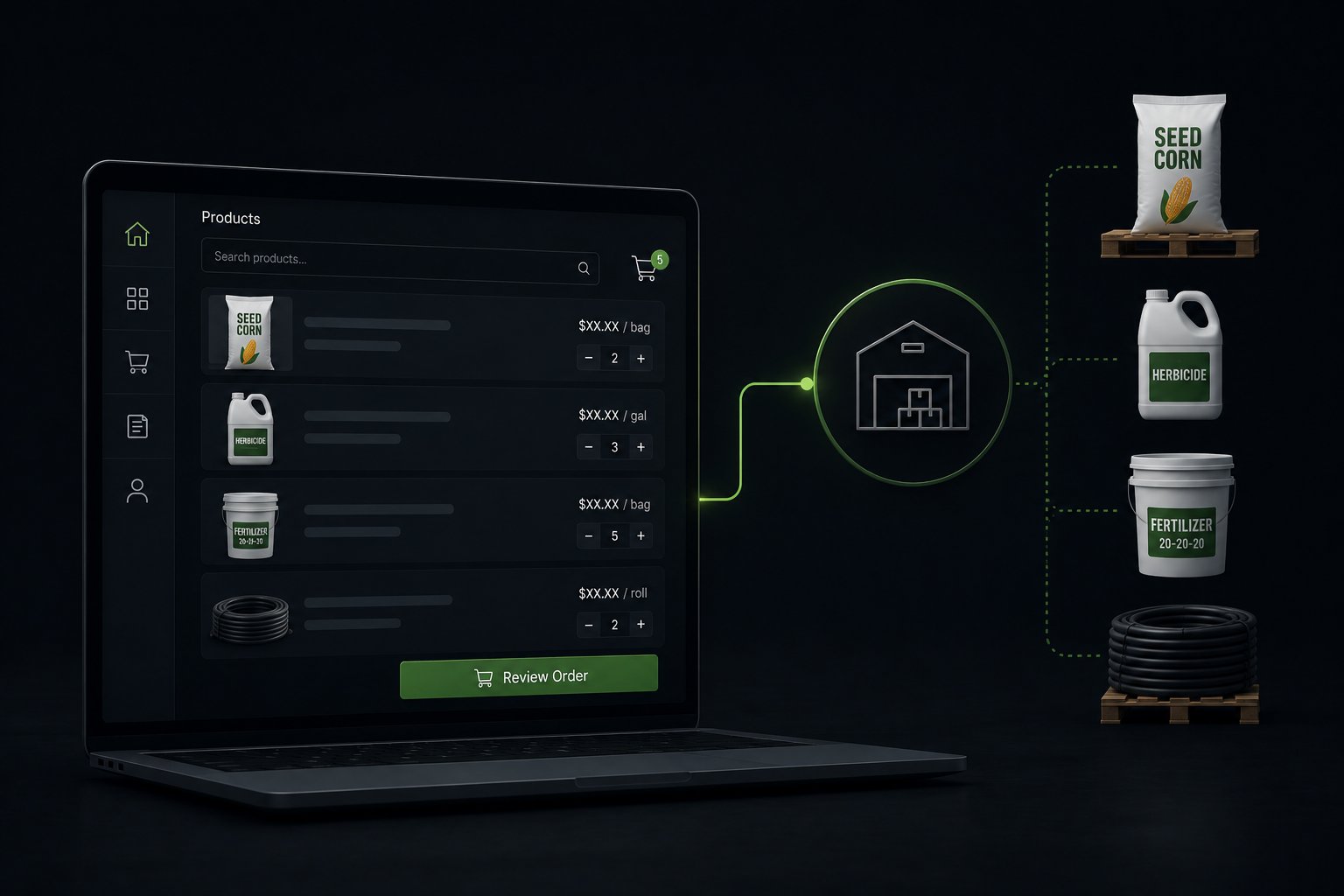
Farm supply distributors are replacing phone, fax, and email ordering with B2B digital portals built on platforms like Shopify Plus. The shift is driven by three converging pressures: farm store buyers who now expect 24/7 self-service access to inventory and pricing, rising operational costs from manual order processing during spring planting and fall harvest peaks, and co-op pricing complexity that outgrows spreadsheet-managed price books. A properly configured wholesale ordering portal gives each account, whether an independent feed store, a buying group member, or a large farm cooperative, a login with their contracted pricing, their approved product catalog, and their payment terms, without requiring a sales rep to field every order.
Traditional Wholesale Ordering vs. a B2B Digital Portal
How Customers Place Orders
Traditional Ordering: Phone, fax, email, or sales rep visit
B2B Digital Portal: Self-service online 24/7
Pricing Accuracy
Traditional Ordering: Seasonal price books, manually updated
B2B Digital Portal: Account-level pricing synced from ERP in real time
Order Entry
Traditional Ordering: Manual keying into ERP
B2B Digital Portal: Auto-creates ERP sales order on checkout
Seasonal Peak Handling
Traditional Ordering: More phone lines, extra staff taking calls
B2B Digital Portal: Portal absorbs volume without adding overhead
Buying Group / Co-op Pricing
Traditional Ordering: Separate price sheets per group
B2B Digital Portal: Shopify Plus catalogs per company account
Restricted Product Compliance
Traditional Ordering: Sales rep verifies license verbally
B2B Digital Portal: License status checked at account setup; product access gated
Reorder Speed
Traditional Ordering: Customer must contact rep, await confirmation
B2B Digital Portal: Reorder from order history in under 2 minutes
Visibility into Order Status
Traditional Ordering: Call the rep or wait for EDI confirmation
B2B Digital Portal: Live order and shipment tracking in customer account
Returns and Credits
Traditional Ordering: Email or phone, manual credit memo
B2B Digital Portal: Online return request; auto-routes to ERP credit workflow
The same portal shift is unfolding across other trades, including how electrical distributors are building B2B online ordering portals.
Why Farm Supply Distributors Are Moving Online Now
The 4,900 farm supply wholesalers in the United States collectively generate $206.1 billion in annual revenue, according to industry research from Vertical IQ. These businesses purchase animal feeds and additives, fertilizers, agricultural chemicals, pesticides, plant seeds, and bulbs in bulk and resell them to independent farm stores, farm and garden retailers, cooperatives, nurseries, and landscaping businesses. The typical farm supply wholesaler operates from one to two locations, employs fewer than 25 people, and generates around $42 million annually.
That scale creates a structural problem when it comes to wholesale ordering. The customer base, often 200 to 800 accounts across a multi-state territory, places orders with concentrated timing around spring planting and fall harvest. A two-week window in March might represent 30 to 40 percent of annual revenue for a regional crop inputs distributor. Handling that volume through phone lines and email inboxes requires either significant seasonal staffing or accepting that some orders are delayed, miskeyed, or lost. Distributors still on a WooCommerce store feel this hardest, since it was never built to carry co-op pricing tiers or account structure at that volume.
The business case for moving wholesale ordering online compounds beyond seasonal efficiency. Three structural shifts in agricultural distribution are accelerating adoption:
Farm consolidation is changing buyer behavior. The USDA reports that farms with gross cash farm income of $1 million or more represent less than 5 percent of US farms but account for nearly half of total US farm production. Large-scale farm operations have professional procurement teams. Those buyers do not want to call a sales rep for a routine reorder of livestock supplies or crop protection products. They want an account login, a digital order history, and a price list that matches their contract, available at any hour.
Buying group and co-op programs are growing in complexity. Regional buying groups and agricultural cooperatives negotiate tiered pricing with distributors on behalf of member stores. Managing those pricing tiers through manually maintained spreadsheets and separate price books creates errors during high-volume seasons. A digital wholesale portal where each buying group gets a dedicated price list, automatically synced from the distributor's ERP, eliminates the pricing discrepancy calls that create friction between distributors and their best accounts.
Independent farm stores are under margin pressure. Smaller independent farm supply retailers face competition from large-format co-ops and national retailers. For them, operational efficiency is a survival issue. Distributors who offer fast, accurate digital ordering with real-time inventory availability give independent stores a competitive advantage in their own operations, which strengthens the distributor relationship and increases switching costs.
What Makes Agricultural Wholesale Different from Standard B2B Ecommerce
Most B2B ecommerce platform content focuses on industrial manufacturing or wholesale distribution of durable goods. Farm supply distribution has several characteristics that require specific platform capabilities.
Seasonal pricing with program commitments. Crop input distributors frequently offer early-order programs: accounts that commit to purchasing a certain volume of fertilizer or crop protection products before the season receive pricing discounts. These commitments must be tracked against the account, tied to the specific products and volumes contracted, and applied automatically when those accounts place orders during the program window. A generic B2B platform cannot handle this without custom development. Shopify Plus handles it through a combination of company-level catalogs, price lists, and Shopify Functions that apply commitment-based pricing rules at checkout.
Restricted-use products and license verification. Pesticides classified as restricted-use products under EPA regulations can only be sold to certified pesticide applicators. Fertilizers sold in commercial volumes may require dealer or commercial applicator licenses in some states. A farm supply distributor selling these products online must gate access to restricted SKUs based on verified license status, not just accept a self-certification checkbox at checkout. This requires a structured account verification workflow: accounts submit their license documentation during onboarding, license status is recorded in the distributor's system, and access to restricted product categories is gated at the company account level in Shopify Plus.
Variable units of measure and packaging. Bulk commodity products like seed, fertilizer, and feed are sold in multiple formats: bags, bulk, super sacks, totes, and carload quantities. The same product may have different prices and minimum order quantities depending on the packaging format. A 50-pound bag of feed has different economics than a pallet of 40 bags. Building this logic into a wholesale portal requires UOM mapping and minimum order quantity enforcement at the catalog level, with clear quantity break pricing displayed at the product level.
Account receivable terms and credit management. Farm supply distributors extend net payment terms to their accounts, typically Net 30 to Net 60, with some preferred accounts on Net 90 terms. Credit limits matter: if an account is over their credit limit or has past-due invoices, the distributor's credit team needs to be able to restrict ordering or require payment before new orders ship. Shopify B2B supports net payment terms natively on the Basic, Grow, Advanced and Plus plans, along with vaulted credit cards for merchants that use Shopify Payments. Because Shopify's B2B features by plan do not include a credit limit, integrating the distributor's ERP AR balance and credit limit data with Shopify, through the integration or an app built during implementation, is what allows credit holds to gate order placement automatically.
Multi-location farm accounts. Large farming operations with multiple locations may need to ship orders to different delivery addresses from a single account. A row crop operation with farms in three counties needs to assign each order to the correct farm address without creating separate accounts for each location. Shopify B2B company accounts, on the Basic, Grow, Advanced and Plus plans, support multiple locations under a single company, with different payment terms or buying permissions per location if needed.
Account-Based Pricing for Co-ops and Buying Groups
Price management is where most farm supply distributors feel the most operational pain. A regional distributor may maintain 15 to 20 distinct pricing tiers: a retail price list, a dealer net price list, buying group A pricing, buying group B pricing, cooperative member pricing, large-account contract pricing, and several seasonal program-specific price lists.
Maintaining these in a spreadsheet and emailing updated price books to accounts at the start of each season is error-prone. Accounts use stale price sheets from previous seasons. Sales reps apply the wrong discount tier. Finance discovers pricing discrepancies at month-end reconciliation.
Shopify Plus's catalog and price list architecture maps directly to this problem. Each pricing tier becomes a Shopify catalog, and each catalog contains the products and prices applicable to that tier. Accounts are assigned to the appropriate company in Shopify Plus, and each company is linked to the catalog that matches their buying relationship. When a feed store buyer logs in, they see only their contracted pricing. When a buying group member logs in, they see their group pricing.
When prices change, the distributor updates the price list in their ERP, and the integration pushes those changes to the corresponding Shopify catalog. Every account sees updated pricing on their next login without any manual communication required.
For seasonal commitment programs with quantity-break pricing, Shopify Functions extend this further: the checkout applies additional discounts based on the quantity ordered, the product group, and whether the account has a pre-season commitment on file. The business logic runs at checkout without requiring custom storefront code that is brittle to maintain.
Seasonal Ordering and Demand Planning on a Digital Platform
Spring planting season is the most operationally demanding period for crop inputs distributors. Orders for seed, fertilizer, and crop protection products arrive in a compressed window, often within four to six weeks. A distributor processing 400 orders per day during peak season, compared to 80 per day in the off-season, cannot scale order entry capacity fast enough to keep up if ordering still runs through phone and email.
A wholesale ordering portal changes the economics of peak season in two ways.
First, it distributes the order entry workload back to the accounts. Instead of a rep entering 50 orders per day, 50 accounts each enter their own order. The distributor's team shifts from data entry to exception handling: managing partial fulfillments, communicating backorders, and processing credits.
Second, it creates a digital record of demand before the season. Early-order programs run through the portal let distributors see committed volume weeks before shipping begins. A crop inputs distributor with visibility into $4 million of pre-committed orders in February can make better inventory procurement decisions than one whose demand visibility ends at the orders currently in the ERP queue.
Seasonal price changes are also simpler on a digital platform. When a distributor needs to implement a midseason price increase for crop protection products due to supply chain disruption, they update one price list in the ERP and the portal reflects it within hours, rather than requiring the sales team to notify each account individually with a revised price sheet.
Handling Restricted Products and Compliance Requirements Online
Moving restricted-use products to an online ordering channel is often the question distributors raise first. The concern is legitimate: selling pesticides or commercial fertilizers without verifying buyer credentials creates legal exposure.
The solution is account-level gating, not channel avoidance. The compliance workflow looks like this:
When a farm store or applicator account registers on the wholesale portal, the account onboarding form collects their state pesticide applicator license number, their EPA applicator certification, and any state-specific commercial fertilizer dealer licenses. The distributor's team reviews and approves the submitted documentation. Once approved, the account's Shopify Plus company record is tagged with the license types they hold, and product collections containing restricted SKUs are added to their catalog.
Accounts without the required license documentation cannot see or order from restricted product collections. They can still order general farm supplies, livestock products, and non-restricted seed varieties. When licenses expire, the distributor's team can remove catalog access until renewed documentation is submitted.
This workflow does not create new compliance obligations. It enforces existing ones more consistently than a phone-based ordering process where a rep might overlook a license check on a busy day in April.
How Uncap Builds Wholesale Portals for Farm Supply Distributors
Uncap's approach to wholesale portal projects for agricultural distributors starts with the pricing and account structure in the distributor's existing ERP, because that is where the complexity lives. The Shopify Plus storefront is the interface; the ERP is the system of record.
Uncap Connect handles the integration between the distributor's ERP (whether NetSuite, SAP Business One, Microsoft Dynamics 365, Epicor, or Acumatica) and the Shopify Plus wholesale portal. The integration manages five core data flows:
Product and pricing sync. Product master data, unit pricing, case pricing, pallet pricing, and program-specific pricing flow from the ERP to Shopify Plus catalogs on a scheduled basis, with event-triggered updates for midseason price changes.
Inventory availability. Warehouse stock levels push to Shopify on a configurable schedule, with safety stock reserves held back to prevent overselling into quantities committed to existing open orders.
Account and company account provisioning. Approved customer accounts in the ERP automatically provision Shopify Plus company accounts with the correct catalog assignment and payment terms, and the integration carries each account's credit limit data.
Order creation. Shopify checkout creates an ERP sales order under the correct customer number, with line items, pricing, shipping address, and payment terms mapped from the Shopify order.
Order status and shipment back-sync. Delivery confirmations and tracking numbers from the ERP push back to the Shopify order so buyers see their shipment status without calling the distributor.
The full scope of Uncap's work with agricultural distributors and specialty distribution businesses is documented on the distributors solution page. The scale this architecture carries is documented on the Farmers Depot case study: 13,046 companies with catalog and pricing relationships, 14,528 customers buying under company accounts, roughly ten company-specific pricing catalogs with volume discounts, and 1,351 products synchronized two-way from Microsoft Dynamics 365 F&O, with purchasing 100% login-required and Shopify Flow automations watching the sync, flagging duplicate companies, and validating catalog assignments so a 13,000-company integration runs without a person babysitting it. That is what a dealer network looks like when it moves online: not a storefront with a login box, but every buying relationship the distributor has, encoded as an account with its own catalog.
What to Expect During Implementation
A wholesale ordering portal project for a farm supply distributor with 300 to 800 active accounts and 2,000 to 15,000 SKUs typically runs 10 to 16 weeks from kickoff to go-live. The phases follow a predictable pattern.
Weeks 1 to 3: Discovery and data audit. Map the ERP customer account structure to Shopify Plus company account model. Identify which pricing tiers need corresponding Shopify catalogs. Audit product data quality: missing weights, dimensions, or unit-of-measure data creates storefront gaps that need cleaning before import.
Weeks 4 to 6: Core integration build. Configure Uncap Connect for the specific ERP. Set up product sync, inventory sync, and account provisioning. Build Shopify Plus catalogs for each pricing tier. Import and validate the initial product catalog.
Weeks 7 to 9: B2B configuration. Configure company accounts for pilot accounts. Assign catalogs and payment terms. Set up restricted product gating logic. Configure order routing rules for multi-warehouse distributors.
Weeks 10 to 12: Testing with pilot accounts. Onboard a cohort of 10 to 20 accounts representing different pricing tiers and product categories. Validate pricing accuracy across buying groups, co-op members, and contract accounts. Test the order-to-ERP workflow end-to-end.
Weeks 13 to 16: Phased rollout. Expand to remaining accounts by tier. Sales reps introduce the portal to their accounts with a guided first-order walkthrough. Monitor order completion rates and support volume to identify friction points before full cutover.
Distributors preparing for an ERP-connected replatforming project benefit from working through the considerations in the enterprise ecommerce replatforming checklist before kickoff. It covers data readiness, integration scoping, and team alignment questions that determine whether a project stays on schedule.
10 Questions Farm Supply Distributors Ask About B2B Online Ordering
Ready to Build Your Wholesale Ordering Portal?
Uncap has built Shopify Plus wholesale portals for distributors in agricultural inputs, specialty chemicals, industrial supplies, and food distribution. As a Shopify Platinum Partner since 2013, we bring 380+ Shopify storefronts' worth of distribution-specific knowledge to every project.
Book a Strategy Session and we will walk through your account structure, pricing complexity, and ERP integration requirements to scope a portal that your accounts will actually use.
Frequently asked questions
1. Can we show account-specific pricing to each customer on the portal?
Yes. Shopify Plus's catalog and price list architecture assigns each company account to the catalog matching their buying tier, whether buying group pricing, cooperative member pricing, or individual contract pricing. Each buyer sees only their price when they log in.
2. How do we handle early-order programs and seasonal commitment pricing?
Early-order programs run through Shopify Plus's catalog pricing combined with Shopify Functions, which apply program-specific discounts at checkout based on account eligibility and product category. Commitment tracking can be managed through integration with the distributor's ERP, where program enrollment records gate access to program pricing.
3. How do we prevent accounts from ordering restricted-use products without the right license?
Restricted SKUs are placed in collections assigned only to company accounts with verified license documentation. Accounts without approved credentials cannot see or add restricted products to their cart. License status is managed at the company account level and can be revoked when licenses expire.
4. What ERPs does the integration support for farm supply distributors?
Uncap Connect supports NetSuite, SAP Business One, SAP S/4HANA, Microsoft Dynamics 365, Epicor, and Acumatica. The integration covers product sync, inventory sync, customer account provisioning, sales order creation, and delivery/tracking back-sync.
5. How do we manage net payment terms and credit limits?
Shopify B2B, on the Basic, Grow, Advanced and Plus plans, assigns payment terms (Net 30, Net 60, Net 90) to each company location. Credit limit data from the ERP can be used to gate ordering for accounts in credit hold status, redirecting them to contact their account manager before placing new orders.
6. Can different locations under one farm account have different ship-to addresses?
Yes. Shopify B2B company accounts, on the Basic, Grow, Advanced and Plus plans, support multiple locations under a single company, each with its own shipping address, billing contact, and optionally different payment terms or buying permissions.
7. How do we handle bulk and variable-quantity products like seed, feed, and fertilizer?
Unit-of-measure configurations in Shopify allow multiple selling units (bag, pallet, tote, bulk) for the same product, with quantity-specific pricing mapped to each. Minimum order quantities enforce palletized or bulk purchasing rules at the product level.
8. What does customer self-service look like for reorders?
Buyers log into their account and access their full order history. They can reorder a previous order in one click or add specific line items from past orders to a new cart. This is particularly valuable for accounts that place recurring monthly feed or supplement orders with consistent SKU lists.
9. How do we phase the rollout without disrupting active accounts during planting season?
The standard approach is to go live with the portal in the off-season, typically August through October, onboard pilot accounts, and expand to the full account base before the following spring planting window. Accounts continue to order through existing channels during the transition; the portal becomes the preferred channel as adoption builds.
10. What makes Shopify Plus a better fit than industry-specific distributor software for this use case?
Industry-specific distributor portals are often outdated and built around desktop-first, low-usability interfaces that buyers find frustrating. Shopify Plus provides a modern, mobile-friendly buying experience with the full B2B feature set needed for agricultural distribution: account-level catalogs, net terms, company locations, and custom checkout logic through Shopify Functions. Choosing the right platform is covered in more depth in the how to choose an enterprise ecommerce platform guide.