Every product page you optimize, every ad you run, every email campaign you send funnels toward a single moment: checkout. For B2B manufacturers, distributors, and wholesalers, that moment is more complex than most guides acknowledge. A buyer purchasing 500 units on a Net 30 account has entirely different checkout requirements than a consumer buying a single item with a credit card.
The Baymard Institute, after more than 200,000 hours of UX research across 130+ ecommerce sites, puts the average checkout abandonment rate at approximately 70%. For B2B buyers, the number is arguably worse because friction compounds: forced account creation, missing PO number fields, no net payment term options, and price list discrepancies cause abandonment that erodes months of sales relationship-building. The stakes are highest in verticals like food and beverage distribution, where order minimums, case-pack rules, and lot data all collide at the payment step.
This guide covers what actually separates a high-converting checkout from one that leaks revenue, with specific guidance on Shopify Plus checkout extensibility, Shopify Functions, and the B2B-native features that manufacturers and distributors need to get right.
B2B vs. B2C Checkout Requirements at a Glance
Account Type
B2C: Guest or personal
B2B on Shopify Plus: Company account with buyer roles
Payment Method
B2C: Card, wallet, BNPL
B2B on Shopify Plus: Net 30/60/90, vaulted cards, ACH
PO Number Field
B2C: Not needed
B2B on Shopify Plus: Required in many procurement systems
Pricing
B2C: Single price list
B2B on Shopify Plus: Customer-specific price lists and catalogs
Order Approval
B2C: N/A
B2B on Shopify Plus: Optional approval workflow for large orders
Minimum Order
B2C: Rarely enforced
B2B on Shopify Plus: Quantity rules and minimum order values
Tax Handling
B2C: Consumer tax rates
B2B on Shopify Plus: B2B tax exemptions per account
ERP Sync
B2C: Not required
B2B on Shopify Plus: Order exports to NetSuite, SAP, Dynamics 365
Checkout Customization
B2C: Standard UX
B2B on Shopify Plus: Shopify Functions + checkout extensions
This table is a useful starting point, but the gap between B2C and B2B goes deeper than a checklist. It touches platform architecture, checkout extensibility, and how orders flow downstream into ERP systems.
Why Checkout Abandonment Happens
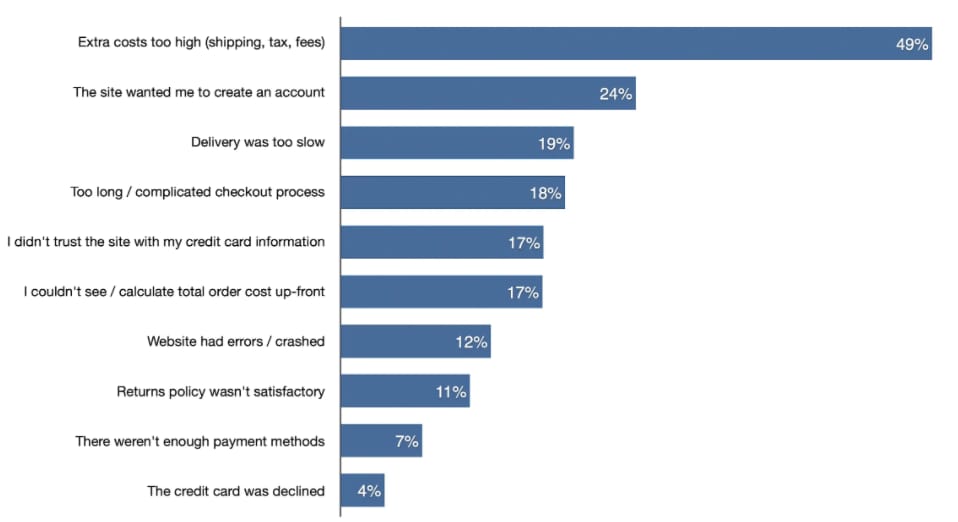
Baymard's research identifies the top reasons shoppers abandon checkout. The numbers apply to both B2B and B2C, but the fixes differ significantly by context.
Forced account creation causes 26% of shoppers to abandon. For B2B, the inverse problem often applies: buyers need to be logged into a company account with the right purchasing role, but the login flow is unclear or the account setup process is too cumbersome. On Shopify Plus, company accounts should be pre-provisioned for buyers before they reach checkout.
Too long or complicated process drives 22% of abandonment. Multi-page B2B checkout forms that ask for information already captured in the company account (shipping address, billing address, payment terms) create unnecessary friction. Shopify Plus stores should pre-fill all known company account data at checkout.
Unclear total cost causes approximately 21% of abandonment. For B2B, this means price list accuracy, volume discount confirmation, and shipping cost clarity all need to be surfaced before the final order confirmation step.
Limited payment options account for 13% of abandonment. For B2B buyers, "limited" means something different: missing net payment terms, no PO number capture, or an inability to use a vaulted corporate card are all dealbreakers.
Trust and security concerns drive 19% of abandonment. A checkout page that looks inconsistent with the rest of your store, lacks SSL indicators, or shows third-party payment branding without explanation will lose B2B buyers who are placing large, often recurring orders.
The B2B Checkout Requirements Most Platforms Miss
Purchase Order (PO) Number Capture
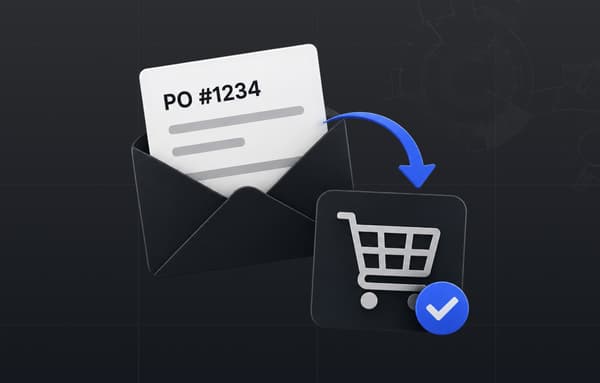
Most B2B buyers operate within procurement systems that require a PO number on every order. Without a PO field at checkout, buyers either cannot complete the purchase or submit the order without the number, creating downstream reconciliation problems.
On Shopify Plus, PO number capture is implemented via Checkout UI Extensions, the modern replacement for editing checkout.liquid. You add a custom input field to the information step, validate the format if needed, and store the value as an order metafield that flows through to your ERP via Uncap Connect.
Net Payment Terms
Net 30, Net 60, and Net 90 are standard in wholesale and distribution. Shopify Plus supports net payment terms natively through the B2B feature set: you configure terms at the company or company location level, and the buyer pays on invoice rather than at the point of checkout.
When a buyer with Net 30 terms checks out, Shopify Plus creates the order with a deferred payment due date. The order then exports to your ERP (NetSuite, SAP S/4HANA, Microsoft Dynamics 365, Epicor, or Acumatica) via Uncap Connect, which carries the net terms, the payment due date, and the PO number as part of the order payload.
Company Account Validation
Before a B2B buyer can access customer-specific pricing, they need to be recognized as a verified company buyer. Shopify Plus stores should require buyers to log in before accessing wholesale pricing, and the checkout experience should confirm which company account, location, and price list is active.
If a buyer is shopping without authentication, the checkout should not present wholesale pricing; it should prompt account login or contact the sales team. This is enforceable via Shopify Plus customer account settings and checkout flow logic.
Vaulted Payment Methods

Repeat B2B buyers often use a single corporate card for all purchases. Vaulted payment methods (securely stored card details that can be reused without re-entry) reduce checkout friction significantly for high-frequency buyers. Shopify Plus supports vaulted cards natively through customer payment methods, accessible in checkout when the buyer is logged in.
Order Approval Workflows
Large or non-standard orders sometimes require internal approval before submission. Shopify Plus does not offer a native multi-step approval workflow, but this can be built using Shopify Functions and a custom app or Uncap Connect integration: orders above a threshold are held pending review, with notification to a procurement manager before the order is confirmed.
Shopify Checkout Extensibility: What Changed
Prior to Shopify Plus's checkout extensibility rollout, customizing checkout required editing checkout.liquid, a fragile approach that broke on every Shopify upgrade and was incompatible with Shop Pay. As of 2024, checkout.liquid is deprecated for new customizations. All checkout modifications now use:
Checkout UI Extensions allow you to add custom content blocks, input fields, banners, and text sections to specific steps in checkout without touching core Shopify code. Examples for B2B: a PO number field, a company account confirmation banner, or a minimum order value alert.
Post-Purchase Extensions appear on the thank-you and order status pages. For B2B, these can surface invoice download links, confirm net payment terms, or prompt the buyer to save their payment method for future orders.
Shopify Pixels enable custom event tracking at checkout, including tracking custom B2B-specific checkout events for analytics.
All of these work seamlessly with Shop Pay and Shopify's accelerated checkout, unlike checkout.liquid customizations which disabled Shop Pay for customized stores.
Shopify Functions: Custom Checkout Logic Without App Bloat
Shopify Scripts were deprecated in June 2026 and replaced fully by Shopify Functions, a more capable and maintainable approach to custom checkout logic. Functions run on Shopify's infrastructure (not a third-party server), execute in WebAssembly for near-zero latency, and support a wider range of customization points.
For B2B checkout, the most relevant Shopify Functions APIs are:
Discount Functions allow you to build custom volume discount logic, customer-group-specific promotions, and B2B-only coupon validation, including discounts that reference company account metafields.
Payment Customizations let you show or hide payment methods based on order attributes. For B2B, this means hiding BNPL options for net terms customers, showing ACH only for accounts above a certain credit limit, or surfacing invoice payment as the default for verified wholesale accounts.
Delivery Customizations control which shipping options appear based on cart or customer attributes. For B2B distributors, this enables showing freight shipping for orders above a weight threshold, hiding residential delivery options for commercial buyers, or surfacing scheduled delivery windows for recurring orders.
Cart Transform functions allow you to restructure the cart before checkout: merging line items, enforcing bundle configurations, or applying quantity rules that validate against company-level minimums.
The practical difference between Shopify Scripts and Functions: Functions are versionable, deployable via CI/CD, and composable: you can layer multiple functions rather than maintaining a single monolithic script that touches everything.
Universal Checkout UX Principles (That B2B Can't Ignore Either)
The B2B-specific features above sit on top of checkout UX fundamentals that apply regardless of buyer type. Getting these right is table stakes.
Transparent Total Costs
Show the complete order total, including shipping, applicable taxes, and any surcharges, before the buyer reaches the payment step. Unexpected costs at the final step are the leading recoverable cause of abandonment. For B2B, this includes surfacing volume discount confirmation ("Your price list discount of 15% has been applied") and any minimum order surcharges clearly.
Checkout Progress Indicators
Whether you use a one-page or multi-step checkout, buyers need to know where they are in the process. A clear progress indicator (Information → Shipping → Payment → Review) reduces uncertainty and completion anxiety, particularly for first-time B2B buyers unfamiliar with your store's flow.
Address Validation and Pre-fill
Use address autocomplete and validation to reduce entry errors. For B2B buyers on company accounts, pre-fill the default shipping address from the company location record. Allow buyers to select from multiple saved company addresses if they manage multiple facilities.
Guest Checkout Strategy for B2B
Guest checkout is standard for B2C but requires deliberate design for B2B. You have three options: require login for all purchases (safest for wholesale pricing integrity), allow guest checkout at retail pricing only, or offer a "request a trade account" flow at checkout that surfaces the B2B application path. The right choice depends on whether your store is exclusively wholesale or operates a mixed B2B/B2C model.
Getting this experience layer right is a theme our founder has spoken about at length in an interview on user experience and ecommerce websites.
Mobile Checkout Optimization
Mobile commerce accounted for approximately 59% of all ecommerce sales in 2025. B2B buyers increasingly place orders from mobile devices, particularly for repeat purchases. Your Shopify Plus checkout should render correctly on all screen sizes, minimize required input fields (pre-fill from account data), and support Shop Pay for accelerated mobile checkout without requiring card re-entry.
Error Handling and Inline Validation
Inline field validation (showing errors in real-time as buyers type rather than after form submission) prevents frustration loops. Validate phone numbers, PO number formats, postal codes, and payment card details inline. For B2B, validate that the buyer's order meets minimum order quantity requirements before they reach the payment step, not after.
ERP Integration at Checkout: The Step Most Guides Skip
For B2B manufacturers and distributors, a perfect checkout experience doesn't end when the buyer clicks "Place Order." The order needs to flow immediately and accurately into your ERP system to trigger fulfillment, update inventory, and initiate invoicing.
Uncap Connect integrates Shopify Plus with NetSuite, SAP S/4HANA, Microsoft Dynamics 365, and Epicor. At checkout, the integration handles:
Order Placed with Net 30 Terms
ERP Action via Uncap Connect: Sales order created with payment due date
PO Number Captured at Checkout
ERP Action via Uncap Connect: PO number added to ERP order record
Company Account Recognized
ERP Action via Uncap Connect: Customer record matched, credit limit checked
Shipping Address Selected
ERP Action via Uncap Connect: Shipping location mapped to warehouse routing
Volume Pricing Applied
ERP Action via Uncap Connect: Order line items reflect ERP price book values
Tax Exemption Active
ERP Action via Uncap Connect: Tax-exempt status applied at order level
The integration runs bidirectionally: Shopify pushes orders to the ERP, and the ERP pushes fulfillment status, tracking numbers, and invoice data back to Shopify. This means buyers see accurate order status and can download invoices directly from their Shopify customer account without calling your customer service team.
Shop Pay: Accelerated Checkout for B2B
Shop Pay is Shopify's accelerated checkout option. It stores buyer contact, payment, and shipping information securely, allowing returning buyers to complete checkout in as few as two taps. For B2B buyers who place repeat orders, Shop Pay eliminates re-entry of card details and shipping addresses on every order.
Shop Pay is compatible with all Shopify Checkout Extensions and Functions. B2B stores using checkout extensibility (PO number fields, custom banners, etc.) retain full Shop Pay compatibility, a key advantage over the deprecated checkout.liquid approach.
For B2B stores with a mix of buyer types, Shop Pay benefits both the wholesale buyer checking out with saved company card details and any B2C customers purchasing at retail.
Checkout Conversion Optimization: A Testing Framework
Checkout optimization is not a one-time project. It is an ongoing process of measurement, hypothesis, and iteration. For Shopify Plus stores, the testing framework should include:
Checkout funnel analysis: Track drop-off at each checkout step in Google Analytics 4 or Shopify Analytics. Identify the step with the highest abandonment rate and prioritize that step for testing.
Abandoned checkout recovery: Shopify Plus includes abandoned checkout email recovery. For B2B, segment recovery emails by account type: a buyer with an active company account who abandoned checkout is a different recovery scenario than a guest visitor.
A/B testing checkout extensions: Use Shopify's built-in checkout editor to test different layouts, messaging, and field arrangements. Test whether adding a PO number field above or below the billing section affects completion rate.
Payment method sequencing: Test the order in which payment methods are displayed. For B2B stores, surfacing net terms and invoice payment prominently (rather than burying them below card and wallet options) typically improves completion rates for wholesale buyers. Stores replatforming from BigCommerce usually arrive with a checkout stitched together from apps, so rebuilding these flows natively is where the early conversion wins come from.
Trust signals at payment: Test the impact of adding security badges, partner logos, and SSL indicators near the payment section on first-time B2B buyer conversion.
Ready to Build a B2B Checkout That Converts?
Uncap has launched 380+ storefronts on Shopify Plus since 2013, including for manufacturers, distributors, and wholesalers. We specialize in B2B checkout architecture, Shopify Functions, and ERP integration via Uncap Connect. If your checkout is losing B2B buyers due to missing PO fields, net terms issues, or ERP sync gaps, we can help.
Frequently asked questions
What is the average ecommerce checkout abandonment rate?
The Baymard Institute, based on data from 130+ ecommerce sites and over 200,000 hours of UX research, puts the average checkout abandonment rate at approximately 70%. This figure represents shoppers who reach the checkout page and do not complete the purchase. Cart abandonment (shoppers who add items but never begin checkout) is a separate, higher metric. For B2B ecommerce, checkout friction tends to be higher due to additional requirements like PO numbers and net payment terms.
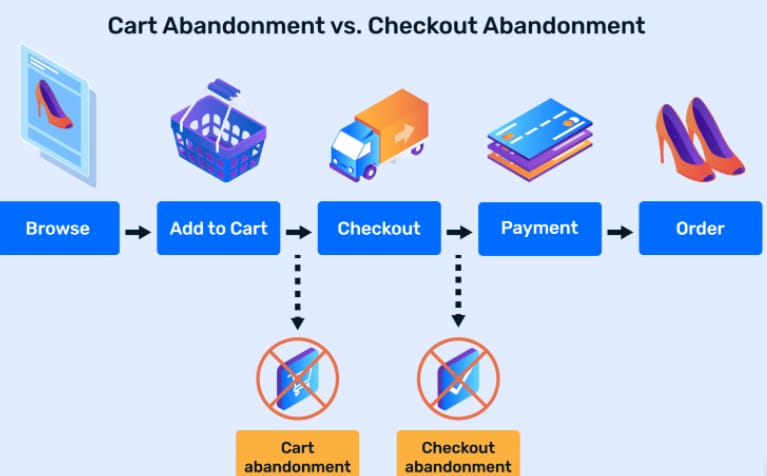
What is the difference between cart abandonment and checkout abandonment?
Cart abandonment refers to shoppers who add products to their cart but never start the checkout process. Checkout abandonment refers to shoppers who begin checkout (entering their information) but do not place the order. Checkout abandonment is the more actionable metric because these buyers have demonstrated high purchase intent: they started the process, which means friction in the checkout flow itself caused them to leave.
How does Shopify Plus handle B2B checkout?
Shopify Plus includes a native B2B feature set that covers company accounts, customer-specific price lists, net payment terms (Net 30/60/90), quantity rules, and vaulted payment methods. Additional B2B checkout customizations such as PO number fields, approval workflow banners, and custom payment method display are implemented using Shopify Checkout UI Extensions and Shopify Functions. These tools replaced the deprecated checkout.liquid and Shopify Scripts (which sunset in June 2026).
What are Shopify Functions and how do they relate to checkout?
Shopify Functions are serverless functions that run on Shopify's infrastructure to customize checkout logic. They replaced Shopify Scripts, which were deprecated in June 2026. Relevant Function APIs for B2B checkout include: Discount Functions (custom volume pricing and B2B-only promotions), Payment Customizations (show/hide payment methods based on order or customer attributes), Delivery Customizations (control shipping options by cart or buyer attributes), and Cart Transform (enforce quantity rules and bundle configurations before checkout).
Can Shopify Plus B2B checkout integrate with ERP systems?
Yes. Uncap Connect integrates Shopify Plus checkout data with NetSuite, SAP S/4HANA, Microsoft Dynamics 365, and Epicor. Orders placed through checkout, including PO numbers, net payment terms, company account data, and line item pricing, are exported to the ERP in real time. The ERP pushes fulfillment and invoice data back to Shopify, giving buyers self-service order status and invoice access.
What is Shopify Checkout Extensibility?
Shopify Checkout Extensibility is the official framework for customizing the Shopify checkout experience without editing checkout.liquid. It includes Checkout UI Extensions (for adding custom fields, banners, and blocks to checkout steps), Post-Purchase Extensions (for customizing the thank-you and order status pages), and Shopify Pixels (for custom analytics events). All extensibility tools are compatible with Shop Pay and work across Shopify's accelerated checkout options.
How should B2B stores handle guest checkout?
B2B stores have three common approaches: require login for all purchases (protects wholesale pricing from unauthorized access), allow guest checkout at retail pricing with a prominent "trade account" application link, or use a hybrid model where guests see retail pricing and authenticated company accounts see their negotiated price list. The choice depends on whether your store serves both B2B and B2C buyers or is exclusively wholesale.
What checkout fields are required for B2B procurement compliance?
At minimum, B2B procurement compliance typically requires: a PO number field (required by most corporate procurement systems), company name and account reference, billing address matching the company's accounts payable address, and tax exemption status confirmation. Larger enterprise buyers may also require a cost center or project code field, which can be added via Shopify Checkout UI Extensions and stored as order metafields.
How does net payment terms work in Shopify Plus checkout?
Net payment terms in Shopify Plus are configured at the company or company location level in the B2B admin. When a buyer with Net 30 terms checks out, Shopify creates the order with a deferred payment due date 30 days from the order date. The order total is not charged to a payment method at checkout; instead, the order is created as "payment pending" and an invoice is issued. The buyer pays by the due date via invoice, bank transfer, or ACH depending on your configured payment methods.
What is the fastest way to reduce B2B checkout abandonment on Shopify Plus?
Start with checkout funnel analysis in Shopify Analytics or Google Analytics 4 to identify the highest-abandonment step. The most common issues for B2B stores are: missing PO number capture (add via Checkout UI Extension), price list confusion (add a price list confirmation banner), and net terms not appearing as a payment option (review company account configuration). Implementing these three fixes typically addresses the majority of avoidable B2B checkout abandonment.