Someone on your ecommerce team pulls up what needs to change. A new customer pricing tier. An updated catalog page. A reorder button for your top accounts. The estimate comes back: six weeks of .NET development and $25,000 in consulting time. For a configuration change.
That moment is why B2B manufacturers and distributors are migrating from Optimizely Commerce to Shopify Plus in 2026.
This guide covers everything you need to evaluate the move: why companies are leaving, what the migration actually involves, how long it takes, what it costs, and how to protect your SEO and revenue through the transition.
What Is Optimizely Commerce? (And Why the Name Confusion Matters)
Before discussing migration, it helps to understand what you are actually running.
Optimizely sells two separate commerce products under one brand name. Commerce Connect is the commerce module built alongside Optimizely's CMS platform, descended from Episerver Commerce, a .NET-based system designed for content-driven retail where the content management system and the storefront are tightly integrated. Configured Commerce (formerly Insite Commerce and B2B Commerce Cloud) is a standalone B2B-specific platform built for manufacturers and distributors with complex pricing hierarchies, account structures, and ERP-driven operations.
These two products were acquired through separate deals. They do not share a codebase, a developer community, or a support structure. They share a brand name because Episerver acquired Optimizely the A/B testing company in 2020 and rebranded the entire portfolio.
This history matters for your migration because the complexity of moving off the platform depends entirely on which product you are running and how it has been customized. A Commerce Connect implementation with deep CMS integration migrates differently than a Configured Commerce deployment with custom .NET pricing modules and a NetSuite ERP connection.
Why B2B Companies Are Moving Off Optimizely Commerce
The Platform's Primary Investment Is No Longer B2B Commerce
Optimizely's market identity and primary product investment centers on digital experience optimization: A/B testing, personalization, and content experimentation. B2B commerce is one product line inside that portfolio. The wholesale features your operation depends on, improved buyer self-service, native payment term enforcement, real-time ERP sync, move at Optimizely's roadmap pace, which follows experimentation demand rather than wholesale demand.
For a B2B manufacturer or distributor, this means you are paying enterprise platform pricing to sit on a roadmap that is not built around your use case.
The .NET Developer Dependency Caps Your Roadmap
Optimizely Commerce runs on ASP.NET Core. Every storefront change, every pricing rule update, every new customer group, runs through a developer queue. Certified .NET commerce developers bill at $150 to $250 per hour and are genuinely scarce. The result is an ecommerce operation where your roadmap is capped by developer availability, not by what the platform can do or what your buyers need.
A real example from B2B manufacturers migrating to Shopify Plus: adding a reorder button that pre-populates a buyer's last order for one-click resubmission. On Shopify Plus, this is a configuration change. On Optimizely Configured Commerce, the same feature required an 80-hour development estimate with a six-week queue. In janitorial and safety supply, where the catalog is wide and reorder-driven, a bottleneck like that gates a top account's repeat orders.
The Total Cost of Ownership Is Significantly Higher Than Most Teams Account For
Optimizely Configured Commerce licensing for a mid-market B2B deployment typically runs $100,000 to $150,000 per year. Enterprise implementations with high GMV, multi-site operations, and advanced B2B feature sets can exceed $500,000 annually.
Add Azure hosting infrastructure, your .NET developer retainer, implementation partner costs, and annual support fees, and the total cost of ownership for a B2B manufacturer on Optimizely frequently exceeds $200,000 per year before a single development project.
Shopify Plus is $2,300 per month, with native B2B functionality that replaces most of what Optimizely requires custom development to build.
Upgrade Cycles Interrupt Operations
Optimizely Commerce releases platform updates on a cadence that requires coordinated deployment, testing, and regression analysis. .NET customizations built for one version may not survive a major platform update. Manufacturers who have been on Episerver or Optimizely for five or more years have managed multiple upgrade cycles, each requiring developer testing, a planned maintenance window, and post-upgrade stabilization.
Optimizely Commerce vs. Shopify Plus: What Changes
CapabilityOptimizely CommerceShopify PlusB2B company accountsAvailable, requires .NET configurationNative, UI-configurableCustomer-specific pricingSupported via custom .NET rulesNative price lists, no developer neededPayment terms and PO supportRequires custom developmentNative B2B featureGated catalogsCustom implementationNative catalog visibility rulesERP integrationCustom .NET connectorsAPI-based, multiple native connectorsStorefront changesDeveloper-dependentMerchant-manageable via editorAnnual platform cost$100K+$27,600Developer requirement.NET specialist requiredStandard Shopify developersCheckout customizationCustom .NET buildsShopify Functions (WebAssembly)
A note on checkout customization: Shopify Scripts reached end-of-life on June 30, 2026. All discount logic, shipping rules, and checkout customizations on Shopify Plus now run through Shopify Functions, a WebAssembly-based framework. If you are evaluating a migration in 2026, your implementation partner should be building Functions-based checkout logic from day one, not Scripts-based logic that requires immediate refactoring.
What Data Migrates from Optimizely Commerce to Shopify Plus
A data migration tool that exports your product catalog and imports it into Shopify is not a B2B wholesale migration. For an operation that has built customer pricing hierarchies, approval workflows, and ERP integration inside Optimizely, that data transfer leaves the core of your operation unaddressed. Here is what a complete migration covers:
Product Catalog and Variants
All product variants, properties, pricing tiers, market-specific pricing, and catalog structure migrate to Shopify's product and variant model. Complex attribute structures from Optimizely's catalog architecture are mapped to Shopify metafields and variant options. Media assets, product images, and document attachments transfer with clean URL references.
Customer Accounts and Pricing Configuration
Every customer account, contact record, address book entry, and customer segmentation tag from your Optimizely environment maps to Shopify customer records and B2B company accounts. Customer-specific price lists, volume discounts, and net payment terms are rebuilt in Shopify Plus's native B2B configuration, and credit limits, which Shopify's B2B features by plan do not include, are enforced through the ERP integration or an app built during implementation. Buyers log in on launch day and find their pricing correct, their terms enforced, and their account history intact.
Order History
Complete order history with line items, fulfillment status, payment information, and customer notes transfers to your Shopify admin. Historical orders are preserved for buyer account visibility and for your internal reporting. Order statuses are mapped between Optimizely's status model and Shopify's fulfillment states.
ERP and Third-Party Integrations
Every Optimizely integration, ERP, PIM, CRM, and marketing platform, is reviewed and rebuilt on Shopify Plus using native connectors or custom API integrations. The batch sync or custom .NET integration your team has been maintaining is replaced with a stable, real-time connection architecture. For NetSuite, SAP, Microsoft Dynamics, and Epicor, bidirectional integrations with continuous order, inventory, pricing, and customer sync are standard. A Sage integration follows the same pattern, keeping pricing and inventory aligned while the old Optimizely modules are retired.
CMS Content and Landing Pages
If your implementation uses Optimizely's CMS alongside Commerce Connect, the migration scope covers both the commerce layer and the content architecture. For most B2B manufacturers, Shopify Plus's native storefront handles standard product and catalog content without requiring a separate CMS. Operations with complex editorial workflows can integrate Shopify with a headless CMS platform while keeping the commerce layer on Shopify Plus.
URL Structure and SEO Redirects
Optimizely URL structures are mapped to Shopify with a comprehensive 301 redirect plan implemented before go-live. Meta titles, meta descriptions, and structured data are reviewed and transferred. Canonical tags are configured correctly. Your organic search rankings carry through the cutover without disruption when the redirect mapping is complete and validated before launch.
The Migration Process: Phase by Phase
Phase 1: Discovery and Audit (Weeks 1 to 3)
The migration begins with a full audit of your Optimizely environment: catalog complexity, custom .NET modules, third-party integrations, B2B pricing and customer account structures, ERP integration points, and CMS content. This audit produces the migration plan, the data mapping specification, and the fixed-scope project definition.
Discovery is where migrations succeed or fail. Teams that skip a thorough audit encounter scope surprises mid-project: a pricing module that has no Shopify equivalent, an ERP connector that requires custom API development, a customer segmentation rule that needs to be rebuilt in Shopify Functions. A proper audit surfaces all of this before work begins.
Phase 2: Data Mapping (Weeks 2 to 4)
Optimizely product types, pricing models, market configurations, customer data structures, and order schemas are mapped to their Shopify Plus equivalents. Every field is accounted for. Custom Optimizely attributes are mapped to Shopify metafields. B2B pricing rules are translated to Shopify price list configurations. Nothing is left undefined.
Phase 3: Shopify Plus Build (Weeks 3 to 10)
Your Shopify Plus store is built in parallel with your live Optimizely storefront. This includes the storefront design (either matching your existing design language or a redesign optimized for conversion and mobile performance), B2B company account configuration, catalog structure, navigation, and checkout logic in Shopify Functions.
Phase 4: Integration Rebuild (Weeks 4 to 12)
All Optimizely integrations are rebuilt on Shopify Plus APIs with full testing before go-live. ERP connections are built to real-time, bidirectional specifications. Payment gateway configurations are migrated. Fulfillment system integrations are rebuilt and validated. Marketing platform connections (email, CRM, analytics) are reconnected to the new store.
Phase 5: Data Migration and UAT (Weeks 10 to 16)
All data migrates to a Shopify Plus staging environment and is verified against the source. Products, customers, orders, pricing configurations, and URL redirects are validated. User acceptance testing is completed with your team against real buyer workflows: logging in, viewing correct pricing, placing orders, processing returns, managing account information.
Phase 6: Go-Live
Your Optimizely storefront continues taking orders throughout the entire migration. The cutover is a coordinated event your team controls. DNS is switched, redirect maps are activated, analytics and tracking are verified, and email notification flows are confirmed. A post-launch monitoring period catches and resolves any issues before they affect buyers at scale.
How Long Does an Optimizely to Shopify Plus Migration Take?
A standard migration from Optimizely Commerce to Shopify Plus takes 10 to 16 weeks from kickoff to go-live, depending on the complexity of your Optimizely environment, the number of custom .NET modules, ERP integration requirements, and catalog size.
Factors that extend timeline:
- Heavily customized Configured Commerce deployments with bespoke .NET pricing modules
- Multi-site or multi-market Optimizely implementations
- Dual Commerce Connect and CMS environments with complex content architecture
- Custom ERP integration requirements beyond standard NetSuite, SAP, or Dynamics connectors
- Large catalog volumes with complex variant and attribute structures
Factors that compress timeline:
- Clean Optimizely implementations with limited custom .NET development
- Straightforward ERP integration with a supported connector
- Willingness to redesign the storefront rather than replicate the existing design
What an Optimizely to Shopify Plus Migration Costs
Migration cost is scoped based on the complexity of your Optimizely environment. The variables are the number of custom .NET modules, the complexity of your B2B pricing and customer account structure, ERP integration requirements, catalog size, and whether you are redesigning the storefront.
The more useful cost comparison is total cost of ownership before and after migration.
Before migration on Optimizely Configured Commerce:
- Platform licensing: $100,000 to $150,000 per year (mid-market)
- Azure hosting: $12,000 to $30,000 per year
- .NET developer retainer: $60,000 to $120,000 per year
- Implementation partner support: variable
- Total: commonly $200,000 or more per year before development projects
After migration on Shopify Plus:
- Platform fee: $27,600 per year
- Hosting: included
- Developer needs: significantly reduced; most B2B configuration requires no development
- Integration maintenance: stable API-based architecture
- Total: typically 30 to 50 percent lower total technology cost within the first year
Most migrations pay for themselves within 12 months through licensing cost reduction alone, before counting developer retainer savings.
SEO Considerations When Migrating from Optimizely to Shopify Plus
Platform migrations are one of the highest-risk events for organic search rankings. A poorly executed migration can produce a 20 to 50 percent drop in organic traffic within weeks of launch. The risks are addressable, but they require deliberate planning before go-live, not after.
301 Redirect Mapping
Optimizely URL structures, particularly for product catalog pages, category hierarchies, and CMS content pages, often differ significantly from Shopify's URL conventions. A complete redirect map covering every indexed URL must be built, validated, and deployed at the moment of DNS cutover, not after. Missing redirects on high-authority pages are the single most common cause of post-migration traffic loss.
Canonical Tags and Duplicate Content
Shopify's URL architecture generates canonical tags by default. Review your catalog structure for any duplicate content scenarios created by the migration, particularly for products appearing in multiple collections, variant pages, and pagination patterns. Configure canonical tags explicitly where Shopify's defaults do not match your intended structure.
Metadata Preservation
Meta titles and meta descriptions from Optimizely do not automatically carry over to Shopify. These must be mapped and transferred as part of the migration. Any meta data that was customized for SEO performance should be reviewed and either preserved or improved during the migration, not defaulted to Shopify's auto-generated values.
Structured Data and Schema Markup
Shopify Plus themes include basic structured data for products (Schema.org Product markup). Review your existing Optimizely structured data implementation and confirm that schema types relevant to your catalog (Product, Organization, BreadcrumbList, FAQPage) are correctly implemented in your new Shopify theme.
Internal Link Audit
Hardcoded internal links within Optimizely CMS content, blog posts, and landing pages may point to old URL structures after migration. An internal link audit and update, run in parallel with the redirect mapping, prevents 301 chains that dilute link equity.
Is Shopify Plus Better Than Optimizely for B2B?
Shopify Plus is a better operational fit than Optimizely Configured Commerce for most B2B manufacturers and distributors at mid-market scale. The reasons are practical, not theoretical.
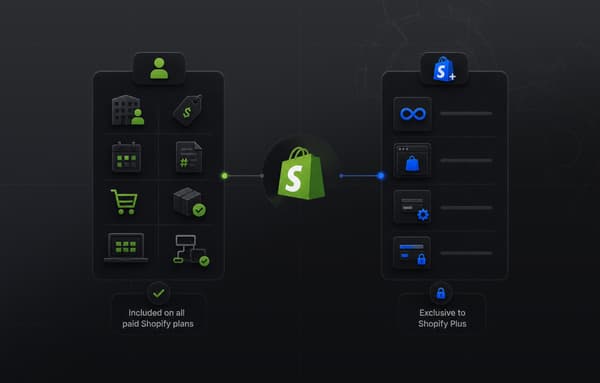
Native B2B functionality on Shopify Plus, company accounts, customer-specific pricing, gated catalogs, payment terms, purchase order support, quantity rules, requires no .NET developer to configure or maintain. Your ecommerce team makes those changes through an interface. The features your Optimizely implementation partner quoted weeks to build are UI-level configuration changes on Shopify Plus.
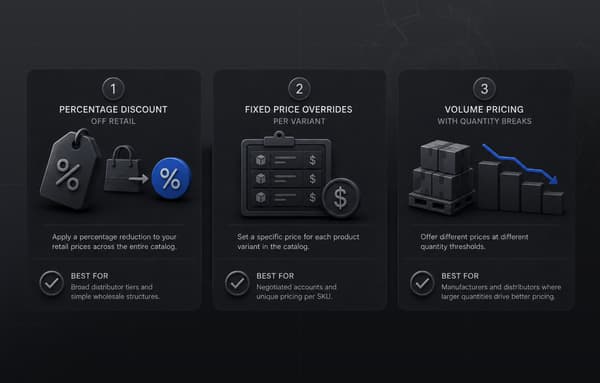
Shopify's commerce roadmap is explicitly built around B2B wholesale use cases. The platform's B2B capabilities have expanded significantly in each recent release cycle, with features directly relevant to manufacturers and distributors: volume pricing, company location management, customer-specific payment terms, and buyer portal customization.
Optimizely Configured Commerce provides deep B2B capabilities and is the stronger fit for organizations where the integration between content management and commerce is a primary requirement, or where B2B complexity, multi-country operations with regulatory compliance requirements, custom approval hierarchies, and deep ERP logic exceeds what Shopify Plus handles natively. Choosing the right platform depends on your specific operational requirements, not on a generic comparison. If your operation runs on NetSuite instead, we walk through moving from NetSuite SuiteCommerce to Shopify Plus.
Working with a Shopify Migration Partner
Migrating a B2B wholesale operation off Optimizely Commerce is not a standard Shopify migration. The complexity is in the B2B layer: the pricing hierarchies, the customer account structures, the ERP integration architecture, and the .NET custom modules that have accumulated over years of platform customization.
Uncap has been building B2B wholesale and distribution commerce on Shopify since 2013 and is a Platinum Shopify Partner. Optimizely Commerce and Episerver migrations with full ERP integration continuity are a core capability. We understand Optimizely's data model for B2B pricing and customer hierarchies, the architecture differences between Commerce Connect and Configured Commerce, and how to map Episerver's content-commerce integration to Shopify's native capabilities. You will not spend the first month of the engagement explaining your platform to us. Our guide to migrating from Optimizely to Shopify Plus outlines how we structure that engagement from audit to cutover.
If you are evaluating a migration from Optimizely Commerce to Shopify Plus, the right next step is a technical review of your environment. We will audit your Optimizely implementation, document every custom module and ERP integration, and provide a fixed-scope plan with timeline and cost.
Continue Reading
- B2B Ecommerce Replatforming: A Step-by-Step Guide to Moving to Shopify Plus
- Shopify B2B Wholesale Setup: Catalogs, Pricing, Permissions, and Net Terms
- Ecommerce for Distributors: Going Online with Shopify Plus
Frequently asked questions
What is the difference between Optimizely Commerce Connect and Configured Commerce?
Commerce Connect is the commerce module built into Optimizely's CMS platform, descended from Episerver Commerce. It is designed for content-driven ecommerce where CMS and commerce are tightly integrated. Configured Commerce is a standalone B2B platform originally built by Insite Commerce and acquired separately. The two products share a brand name but not a codebase, a developer community, or a support structure.
What is the difference between replatforming and rebuilding?
Replatforming moves your ecommerce operation from one platform to another while preserving your existing data, processes, and integrations. Rebuilding refers to rewriting an application from scratch. An Optimizely to Shopify Plus migration is a replatforming project: your products, customers, orders, pricing configurations, and integrations move to a new platform rather than being rebuilt from zero.
Will my Optimizely store stay live during the migration?
Yes. A properly managed migration runs both environments in parallel. Your Optimizely storefront continues taking orders throughout the entire migration. The cutover is a coordinated event your team controls, not a hard switch that puts revenue at risk.
How do I protect my SEO rankings during the migration?
Protect SEO rankings by building a complete 301 redirect map before go-live, preserving meta titles and descriptions during data transfer, implementing structured data correctly in the new Shopify theme, and auditing internal links for hardcoded Optimizely URLs. The redirect map must be deployed at the moment of DNS cutover. Teams that deploy redirects after launch lose ranking signals during the gap.
Is Shopify Plus worth it in 2026?
For B2B manufacturers and distributors migrating off enterprise platforms with high total cost of ownership, Shopify Plus consistently delivers 30 to 50 percent lower total technology costs within the first year through licensing cost reduction and reduced developer dependency. The platform's native B2B capabilities, continuous release cadence, and merchant-manageable configuration make it the most operationally accessible enterprise commerce platform in the market at mid-market scale.
What happens to my ERP integration when I migrate?
Your ERP connection is rebuilt as part of the migration. Whether you are running NetSuite, SAP, Microsoft Dynamics, or Epicor, a real-time, bidirectional integration to Shopify Plus replaces the custom .NET connector your team has been maintaining. Orders, inventory, pricing, and customer account data sync continuously from go-live.
How much does migrating from Optimizely to Shopify Plus cost?
Migration cost depends on the complexity of your Optimizely environment: the number of custom .NET modules, ERP integration requirements, catalog size, and B2B pricing structure. The more useful number is total cost of ownership. Most B2B manufacturers moving off Optimizely see 30 to 50 percent lower total technology costs in year one through licensing savings alone.