Net payment terms are not a perk you offer wholesale buyers. They are a baseline expectation. Most enterprise buyers and distributors operate on terms as a matter of purchasing policy, and for manufacturers building a formal wholesale channel, the ability to offer Net 30, Net 60, or Net 90 at checkout is often the difference between getting a purchase order and not.
Shopify's native B2B layer now includes net terms on the Basic, Grow, Advanced, and Plus plans as of April 2026. Getting them configured is not complicated. What is less documented is how the full payment workflow actually operates: how buyers experience it at checkout, how you collect on it after fulfillment, and where Shopify's tracking stops and your accounts receivable process has to begin.
What Are Shopify Net Terms?
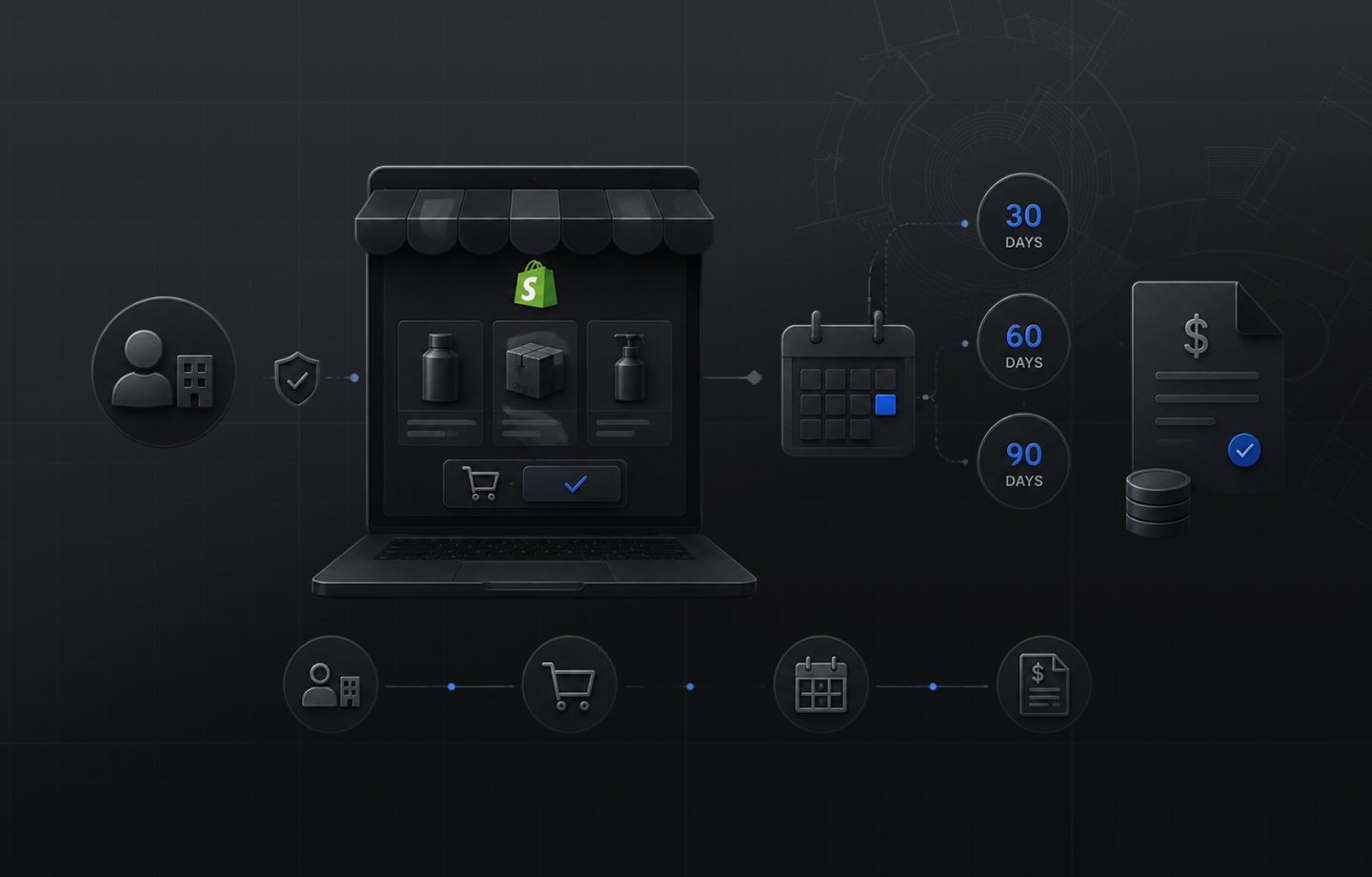
Shopify net terms are B2B payment conditions that allow wholesale buyers to place orders and pay within a defined period after the order date. Shopify supports six native term lengths: Net 7, Net 15, Net 30, Net 45, Net 60, and Net 90. All terms run from the date the order is placed. Terms are assigned at the company or company location level in Shopify's B2B admin, and they are enforced automatically at checkout for the buyer without any manual intervention on a per-order basis. This matters most in categories like furniture and home goods, where large contract orders and long production cycles make deferred payment the norm rather than the exception.
Net terms are distinct from standard payment at checkout. A buyer assigned Net 30 places the order, Shopify creates it with a payment due date 30 days out, and the order enters your fulfillment workflow without payment collected upfront. You fulfill the order, then collect payment separately through the invoice flow. Shopify's official payment terms documentation covers configuration steps for assigning terms at the company and location levels.
Which Shopify Plans Include Net Terms?
Net terms are included on the Basic, Grow, Advanced, and Plus plans. This expanded in April 2026 when Shopify moved its foundational B2B feature set to the Basic, Grow, and Advanced plans. Before that, net payment terms were gated behind a Shopify Plus contract.
For the full picture of what the April 2026 expansion covered across plan tiers, the Shopify B2B on Basic, Grow, and Advanced guide covers every feature in detail.
One net terms-related feature that remains Plus-only is deposits: collecting a partial upfront payment alongside a deferred balance on the same order. For the standard Net 30/60/90 flow without a deposit component, the Basic, Grow, Advanced, and Plus plans all have full access.
How Net Terms Work for the Buyer at Checkout
When a buyer logged in to their company account reaches checkout on a store where their assigned company location has net terms set, the checkout presents those terms as the default payment method. No credit card required. The buyer places the order on account, sees the payment due date on their confirmation, and the order goes through.
The purchase order number field is part of this same checkout flow. Wholesale buyers can enter their internal PO number before submitting the order. That number comes through with the order in your Shopify admin and appears on any invoices generated from it, which is a standard requirement for any enterprise buyer's accounts payable workflow.
From the buyer's perspective, the experience is clean. Terms are pre-set on their company account. They know what they owe and when it is due before they submit. There is no back-channel negotiation, no separate form, and no requirement to contact a sales rep to place an order on terms.
How to Collect Payment on Net Terms Orders
Placing the order is automatic. Collecting payment on the due date is a separate process that Shopify gives you tools to manage but does not run end-to-end.
Payment request emails. When an order is ready for collection, Shopify can generate a payment request email sent to the buyer. This email includes a link to a hosted payment page where the buyer pays using any method you have enabled, including credit card via Shopify Payments or bank transfer instructions. The payment request can be sent immediately after fulfillment or timed to the due date, depending on your collection process. Shopify's deferred payment management documentation walks through the full collection workflow step by step.
Automated payment reminders. Shopify lets you configure automated reminder emails at set intervals before and after the due date. These go to the buyer contact on file. The cadence is configurable by terms length, so a Net 90 account can have a different reminder schedule than a Net 30 account.
Manual mark-as-paid. If a buyer pays by bank transfer, check, or wire outside the Shopify invoice link, you mark the order as paid in the admin once payment is confirmed on your end. This is common for buyers who have established payment procedures and do not use the online payment link.
Operational note for wholesale operators: Shopify tracks whether a net terms order is outstanding or paid at the order level. It does not produce an accounts receivable aging report, and it does not automatically sync to an ERP or accounting system. If your finance team manages AR outside Shopify, what happens in Shopify stays in Shopify unless you have a connector that bridges the two. This gap is covered in detail below.
Assigning Net Terms by Buyer Type
Net terms are assigned at two levels in Shopify B2B: the company level, which applies across all locations under that company, or the company location level, which allows different terms for different ship-to accounts under the same buyer.
For wholesale programs with a standard tier structure, company-level assignment is usually simpler. Assign Net 30 to a distributor company and all their locations inherit it automatically. For buyers who operate with separate purchasing authority and billing by location, location-level assignment lets you reflect how the buyer's procurement actually works. A national account with independent regional buyers is a common example: the company is one account, but each regional office might negotiate different terms.
Shopify also supports bulk term assignment for large buyer lists through CSV import. This matters when migrating an existing wholesale program onto Shopify with hundreds of existing accounts. Setting terms on 200 company locations manually one at a time is not realistic. The import flow handles it in a single operation. That bulk step is especially useful for wholesalers coming off BigCommerce, where terms had been stitched together across several apps.
For a full explanation of how the company account and location structure in Shopify B2B is organized, the Shopify B2B for wholesale suppliers guide covers the account architecture in detail.
Deposits Alongside Net Terms (Shopify Plus)
For manufacturers who take orders before production, a straight net terms arrangement does not always match how the transaction actually works. A made-to-order manufacturer typically collects a deposit at order time and defers the remaining balance to a net terms due date at fulfillment or delivery.
Shopify Plus supports deposit collection alongside net terms on B2B orders. The deposit can be a fixed amount or a percentage of the order total. The buyer pays the deposit when the order is confirmed; the balance is deferred to the net terms due date. This is managed through the draft order flow in the Shopify admin rather than through the self-serve checkout, which means a sales rep typically builds the order and sends the invoice to the buyer.
For non-Plus merchants, collecting a deposit on a B2B order requires a workaround: taking the deposit as a separate draft order transaction and adjusting the outstanding balance manually. It works, but it adds steps. If deposit workflows are a standard part of your sales motion with made-to-order or custom-production buyers, that is one of the operationally clearer arguments for Shopify Plus.
What Shopify Net Terms Do Not Cover
Shopify's net terms feature handles the buyer-facing checkout experience well and gives you the basic tools to send invoices and track payment status. It does not cover the full accounts receivable operation that wholesale businesses run alongside it.
No AR aging report. Shopify does not produce an aged receivables report. If you have 50 accounts on net terms at different stages of the payment cycle, knowing which are current, which are approaching due, and which are past due requires exporting order data or connecting a reporting layer. Finance teams that rely on AR aging for cash flow management cannot get that view natively inside Shopify.
Credit limit enforcement. Shopify says "Payment terms define how long a company has to pay for an order." Holding a buyer to a credit limit at checkout is a separate rule, built as a checkout validation with Shopify Functions, which Shopify says "can block checkout progress when business rules aren't met." It can run inside a public App Store app, which stores on any plan can use, or a custom app, which needs Shopify Plus, or the check can be a manual approval step before orders are fulfilled.
No ERP sync by default. For wholesale operations running NetSuite, SAP, or Microsoft Dynamics as their financial system of record, Shopify net terms orders do not automatically create AR records in the ERP. Without an integration that syncs Shopify orders to your ERP, your finance team manually creates the corresponding AR entries, which creates reconciliation overhead and the risk of invoices falling through the gap. Uncap Connect is built specifically for this: Shopify orders sync to your ERP automatically, including net terms orders with payment due dates and outstanding balances, so your AR stays accurate without manual entry between systems. For operations that run their books in QuickBooks, that sync keeps invoices and payments reconciled against the same orders buyers placed online.
No collections workflow. When a net terms invoice goes past due, Shopify's built-in tools stop at the payment reminder. What happens next is a manual process on your side: a call, an email, or a handoff to your collections team. Operations managing a meaningful volume of overdue accounts need a process outside Shopify to handle escalation.
Deciding whether these gaps justify the upgrade is its own question, and our breakdown of Shopify B2B versus Plus for wholesale weighs when Plus is actually worth it.
When Shopify Net Terms Are Enough vs. When You Need More
For most wholesale operations launching a B2B channel on Shopify, native net terms are the right starting point. They handle the buyer checkout experience correctly, integrate with the rest of the B2B feature set, and work on the Basic, Grow, Advanced, and Plus plans without additional apps.
The situations where you need a layer on top of native net terms are specific: you need AR aging visibility for your finance team, you need credit limit enforcement at the checkout level, you are integrating with an ERP that needs order-level AR data, or you are managing enough past-due volume that a manual collection process is no longer workable.
For wholesale commerce on Shopify, the right implementation design connects the buyer-facing net terms experience to the back-office collection process from the start. That means getting clear on your ERP, your AR workflow, and where Shopify's native layer ends before you go live with your buyer program.
As a Shopify Platinum Partner, on Shopify since 2013, with 380+ commerce storefronts launched on Shopify, Uncap has configured net terms workflows for manufacturers and distributors across a wide range of buyer programs and ERP environments. If you are setting up net terms on Shopify and want to make sure the implementation covers both the buyer experience and the back-office collection process, Talk to Our Experts about how to structure it for your operation.
Frequently asked questions
Does Shopify support net payment terms?
Yes. Net terms (net 15/30/60/90, or due on fulfillment) are part of native Shopify B2B on the Basic, Grow, Advanced, and Plus plans: buyers check out on terms and the order carries a payment due date.
How do buyers use net terms at checkout?
A buyer from a company with terms assigned sees a pay-later option at checkout instead of a card wall. The order completes with the balance due inside the agreed window.
How do you collect payment on net terms orders?
From the order's payment page: send a payment reminder with a secure checkout link, charge a vaulted card if one is stored, or record an offline payment like ACH or check against the order.
What do Shopify net terms cover, and what stays in the back office?
Shopify says "Payment terms define how long a company has to pay for an order." You set them for each company location. Credit checks, credit limits, dunning and AR aging stay a back-office decision, usually run in the ERP and synced to which companies get terms.