Gartner predicts 80% of B2B interactions will take place digitally by 2025. The US B2B ecommerce market is projected to surpass $3 trillion by 2027. And yet, most B2B websites still fall short of what buyers actually need: 90% of global B2B customers expect an online shopping experience equivalent to what they get on B2C sites, and the majority report that their suppliers are not delivering it.
The gap between expectation and execution is where deals are lost. A manufacturer or distributor with a poor B2B website loses to a competitor with a better one, not necessarily a better product.
This guide covers 15 must-have features for a B2B ecommerce website, with specific guidance on how each is implemented on Shopify Plus. Whether you are building a new B2B site or auditing an existing one, this list serves as the benchmark.
15 B2B Ecommerce Website Must-Haves at a Glance
1. Company Accounts + Buyer Roles
Why It Matters: Multiple users per business account
Shopify Plus Implementation: Native B2B company accounts
2. Customer-Specific Catalogs
Why It Matters: Show only relevant products per buyer
Shopify Plus Implementation: Shopify Plus catalogs
3. Account-Specific Pricing
Why It Matters: Negotiated price per customer/tier
Shopify Plus Implementation: Price lists per catalog
4. Advanced Search + Filtering
Why It Matters: Buyers find products fast
Shopify Plus Implementation: Shopify Search + third-party AI
5. Quick Order Pad / CSV Upload
Why It Matters: Repeat buyers order by SKU without browsing
Shopify Plus Implementation: App or custom extension
6. Real-Time Inventory
Why It Matters: Accurate stock, no backorder surprises
Shopify Plus Implementation: ERP sync via Uncap Connect
7. B2B Checkout (PO, Net Terms)
Why It Matters: Procurement compliance
Shopify Plus Implementation: Checkout extensibility + B2B native
8. Self-Serve Buyer Portal
Why It Matters: Order history, invoices, reorders without CS
Shopify Plus Implementation: Shopify customer accounts
9. Mobile-Optimized Experience
Why It Matters: 78% of B2B buyers want better mobile
Shopify Plus Implementation: Responsive themes + Shop Pay
10. ERP Integration
Why It Matters: Accurate pricing, inventory, and order data
Shopify Plus Implementation: Uncap Connect
11. Punchout / eProcurement
Why It Matters: Required by government and enterprise buyers
Shopify Plus Implementation: Punchout2Go + Shopify API
12. Quote Request / RFQ Workflow
Why It Matters: Large or custom orders need quoted pricing
Shopify Plus Implementation: Apps + Shopify draft orders
13. Multi-Location Account Management
Why It Matters: Buyers managing multiple ship-to addresses
Shopify Plus Implementation: Company locations in Shopify B2B
14. Customer Segmentation + Access Control
Why It Matters: Different buyers see different content
Shopify Plus Implementation: B2B + customer metafields
15. Reporting and Analytics
Why It Matters: Track buyer behavior, reorder rates, revenue
Shopify Plus Implementation: Shopify Analytics + BI tools
Why Most B2B Websites Fail Their Buyers
B2B websites are not simply B2C stores with different products. The buyers are different, the purchasing processes are different, and the technical requirements are different. Yet most B2B websites are built with B2C frameworks and B2C assumptions.
The consequences show up in three ways: buyers abandon because they cannot find the right product quickly, buyers call your sales team for things your website should handle automatically, and buyers choose competitors whose digital experience is less frustrating.
According to McKinsey, 60% of B2B customers find buying products online more convenient than working through traditional channels. That preference is strong and growing. But convenience is only available when the website has the right features. When it does not, the digital channel becomes a liability rather than an asset. Brands replatforming off VTEX often make this move to simplify a stack that had grown heavier than the team could maintain.
The 15 features below represent what it takes to give B2B buyers the experience they expect in 2026.
1. Company Accounts and Buyer Roles
B2B purchasing is not a one-person transaction. A mid-sized manufacturer might have a purchasing manager who approves orders, a plant supervisor who requests products, and a finance contact who handles invoicing. All three need access to the same account, with different permissions.
On Shopify Plus, this is handled natively through company accounts. A company account can have multiple buyers attached to it, each assigned a role (administrator or buyer) that determines what they can see and do. Purchasing managers can see full account details, past orders, and invoices. Junior buyers can browse and add to cart but cannot complete checkout without approval.
Company accounts are the foundation everything else is built on: pricing, catalogs, payment terms, and order history all attach to the company account, not the individual user.
Implementation on Shopify Plus
Company accounts are configured in the B2B section of the Shopify Plus admin. Each company can have one or more locations, each with its own shipping address, price list, payment terms, and tax settings. Buyers are invited to the company account via email and assigned their role by the account administrator.
2. Customer-Specific Catalogs
A manufacturer selling to both retail outlets and wholesale distributors should not show both buyer types the same product catalog. Retail buyers see consumer packaging. Wholesale buyers see bulk SKUs, case quantities, and pallet pricing. Showing the wrong catalog creates confusion and undermines the professional relationship.
Shopify Plus catalogs let you define exactly which products are visible to each company or group of companies. You can create a catalog for your retail channel, a catalog for your wholesale distributors, and a catalog for your OEM accounts, each with its own product selection and pricing.
Catalogs also prevent buyers from seeing products they are not authorized to purchase, which is critical for businesses with product lines that require distributor certification, minimum purchase agreements, or territory restrictions.
3. Account-Specific Pricing
Every B2B account has its own pricing structure. A longtime wholesale customer might have negotiated 20% below list. A new account starts at list. A strategic partner gets special pricing on specific SKUs. Managing this manually, via spreadsheet or sales rep memory, is error-prone and does not scale.
On Shopify Plus, price lists are attached to catalogs and apply to specific companies or company locations. Pricing can be set as a fixed price per SKU, a percentage adjustment from the base price, or volume-tiered pricing that changes based on quantity ordered. When a buyer logs in, they see their contracted pricing automatically, without calling their sales rep to confirm.
Price lists sync bidirectionally with ERP systems via Uncap Connect: if a price changes in your ERP (NetSuite, SAP S/4HANA, Microsoft Dynamics 365, or Epicor), it updates in Shopify Plus automatically, ensuring the website never shows stale pricing.
4. Advanced Search and Filtering
B2B buyers are purchasing agents and technical staff who know exactly what they want. They search by part number, manufacturer, specification, or SKU. A basic keyword search that returns irrelevant results wastes their time and drives them to call customer service rather than order online.
Research shows that 27% of US B2B buyers identify easy product finding as the most important feature of an online purchasing experience. Advanced search is not optional for B2B sites serving buyers with large, complex product catalogs.
The requirements for B2B search go beyond consumer-grade ecommerce search:
Part number and SKU search must return exact matches for the buyer's own part numbers and your catalog numbers, even when they differ.
Faceted filtering allows buyers to refine results by attributes (size, material, specification, availability, brand) rather than browsing category pages.
Long-tail semantic search handles complex product descriptions and technical queries. Research from nopCommerce cites that long-tail search implementation reduces cart abandonment from 40% to 2%.
Autocomplete surfaces relevant products as the buyer types, reducing time-to-product and increasing average order value through related product discovery.
On Shopify Plus, native search handles basic requirements. For distributors and manufacturers with large catalogs (10,000+ SKUs), third-party search apps such as Searchanise, Boost Commerce, or Klevu provide AI-powered search, synonym management, and product merchandising that significantly improves findability.
5. Quick Order Pad and CSV Ordering
Repeat B2B buyers do not want to browse category pages. They know what they need. A purchasing agent replenishing standard stock items should be able to enter a list of SKUs and quantities and go directly to checkout.
A quick order pad is a dedicated interface where buyers type or paste SKUs and quantities directly, bypassing the browse-and-add-to-cart flow. For buyers with large recurring orders, a CSV upload option allows them to prepare their order offline and upload it in a single step.
This feature is standard at industrial distributors and wholesale suppliers. B2B sites that lack it push repeat buyers to call in orders or use a competitor's website.
Shopify Plus supports quick order functionality through apps like Quick Order Line Item Drawer, and custom implementations can be built using the Shopify Storefront API. For B2B stores serving buyers with ERP-generated purchase lists, CSV upload functionality is essential and can be connected to Uncap Connect for order validation against live inventory.
6. Real-Time Inventory
Displaying inventory levels that do not match actual warehouse stock destroys buyer trust. A purchasing manager who orders 500 units, receives confirmation, and later learns only 200 are available will escalate to their sales contact and think twice before ordering online next time.
Real-time inventory display requires a live connection between your website and your inventory management system or ERP. On standalone ecommerce platforms without ERP integration, inventory is typically updated in batch (nightly or weekly), which means it is always slightly stale. For distributors with fast-moving inventory, batch updates are inadequate.
Uncap Connect provides a real-time API connection between Shopify Plus and NetSuite, SAP S/4HANA, Microsoft Dynamics 365, and Epicor. When a buyer views a product page, the stock level reflects the current warehouse state. When they add to cart, the quantity is reserved against live inventory. This eliminates backorder surprises and reduces customer service contacts significantly.
Additional inventory features critical for B2B include: back-in-stock notifications for buyers waiting on specific SKUs, warehouse-level availability display for multi-location distributors, and substitution suggestions when a product is out of stock.
7. B2B Checkout with PO Numbers and Net Payment Terms
The checkout page is where B2B requirements diverge most sharply from B2C. A B2C checkout needs a shipping address, an email, and a credit card. A B2B checkout needs all of that plus: a purchase order number, confirmation of negotiated pricing, the correct payment terms, company account validation, and potentially an order approval workflow.
When any of these elements is missing, buyers either cannot complete their purchase or complete it incorrectly, creating downstream problems in their own procurement systems.
Purchase order (PO) number capture is a legal and procurement requirement for most corporate buyers. Without a PO number field, buyers cannot submit the order to their finance team for processing.
Net payment terms (Net 30, Net 60, Net 90) are standard in wholesale and distribution. Shopify Plus handles net terms natively: buyers with configured terms check out without paying immediately, and Shopify creates an invoice with a due date. The order exports to your ERP via Uncap Connect with the full payment terms data.
Order approval workflows allow purchase managers to review and authorize orders above a threshold before they are confirmed. This maps to corporate procurement controls without requiring buyers to leave the website.
On Shopify Plus, PO number capture and approval workflow notifications are implemented via Checkout UI Extensions, replacing the deprecated checkout.liquid approach. For more on Shopify's checkout extensibility stack, see our guide to B2B checkout on Shopify Plus.
8. Self-Service Buyer Portal
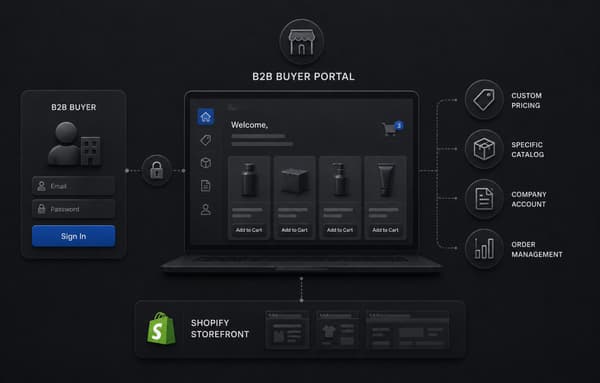
A self-service buyer portal reduces your customer service volume by giving buyers direct access to everything they need: order history, invoice downloads, shipment tracking, account details, and reorder capability, without a phone call or email.
For distributors and manufacturers with hundreds of active accounts, the customer service savings are significant. More importantly, buyers who can self-serve tend to order more frequently because placing and tracking orders requires less effort.
Shopify Plus customer accounts provide the foundation: order history, address management, and payment method storage. For a full B2B self-service experience, the buyer portal should include: invoice management and download (especially important for Net 30/60/90 customers), shipment tracking with carrier integration, return authorization initiation, account statement visibility, and saved order lists or "favorites" for repeat orders.
The Shopify B2B Wholesale Setup guide covers how to configure customer accounts for B2B buyers in detail.
9. Mobile-Optimized Experience
According to BigCommerce research, 78% of global B2B buyers wish their suppliers offered a better mobile experience. Mobile is not an afterthought for B2B: purchasing managers check order status on their phones, sales reps use tablets in the field to place orders on behalf of accounts, and plant supervisors submit reorders from the warehouse floor.
A mobile-optimized B2B ecommerce site is not simply a responsive layout. It requires: touch-friendly product navigation, a search experience optimized for mobile keyboards, a checkout flow that minimizes required input fields (pre-filled from account data), and support for Shop Pay or digital wallets for faster mobile order completion.
On Shopify Plus, all standard themes are mobile-responsive. Shop Pay is available for all Shopify Plus stores and is fully compatible with Checkout UI Extensions, giving B2B buyers the option to complete repeat orders in two taps with saved payment and shipping information.
Site performance on mobile is equally important. According to BigCommerce, 60% of B2B buyers say load speed has stopped them from completing a purchase. Google Core Web Vitals score your store's mobile performance and directly affect your search ranking. Shopify Plus stores hosted on Shopify's infrastructure benefit from Cloudflare CDN and Shopify's edge network, delivering consistently fast load times.
Several of these must-haves map to capabilities Shopify now ships natively, which we catalog in the complete guide to native Shopify B2B features.
10. ERP Integration
Your ERP system is the source of truth for pricing, inventory, customer credit limits, and order history. Your B2B website should reflect that truth in real time, not duplicate it with a separate, stale data set.
Without ERP integration, B2B websites create operational friction at every step: pricing shown online differs from what the sales rep quoted, inventory shown online does not match warehouse stock, orders placed online have to be re-entered manually into the ERP, and invoices generated in the ERP are not visible to the buyer on the website.
Uncap Connect integrates Shopify Plus with NetSuite, SAP S/4HANA, Microsoft Dynamics 365, and Epicor with a bidirectional, real-time data sync.
Customer Price Lists
Direction: ERP to Shopify
Benefit: Website always shows contracted pricing
Inventory Levels
Direction: ERP to Shopify
Benefit: Buyers see accurate stock in real time
New Account Creation
Direction: Shopify to ERP
Benefit: B2B registrations auto-create ERP records
Orders
Direction: Shopify to ERP
Benefit: No manual re-entry, immediate fulfillment trigger
Fulfillment + Tracking
Direction: ERP to Shopify
Benefit: Buyers self-serve order status
Invoices
Direction: ERP to Shopify
Benefit: Buyers download invoices from customer portal
Credit Limits
Direction: ERP to Shopify
Benefit: Checkout validates against account credit
The ecommerce platform guide for distributors covers ERP integration architecture in more depth.
11. Punchout and eProcurement
Enterprise and government buyers often manage all purchasing through an eProcurement system (SAP Ariba, Coupa, Oracle iProcurement, Jaggaer). These systems allow procurement teams to control spend, enforce approved vendor lists, and maintain complete purchasing records. Punchout integration connects your ecommerce site directly to your buyer's procurement system.
When a buyer punches out, they are redirected from their procurement portal to your website, where they browse and add items to a cart configured for their specific account. When they click checkout, the cart transfers back to their procurement system as a purchase requisition, which goes through their internal approval workflow before becoming a confirmed order.
For manufacturers and distributors serving large enterprise accounts, government agencies, or university buyers, punchout is often a requirement for being on the approved vendor list. Competitors who offer punchout win these accounts; those who do not are excluded.
On Shopify Plus, punchout is implemented via third-party services such as Punchout2Go, which provides the cXML and OCI protocol handling required by major procurement platforms, connected to Shopify via API.
12. Quote Request and RFQ Workflow
Not every B2B purchase is a straightforward add-to-cart transaction. Large orders, custom configurations, and new products often require a formal quote before the buyer can raise a purchase order. A quote request or request for quotation (RFQ) workflow allows buyers to submit a request directly from the website, which your sales team then responds to with a formal quotation.
On Shopify Plus, RFQ workflows are implemented using draft orders: the sales team creates a draft order with custom pricing, which is shared with the buyer as a link. The buyer reviews and accepts the quote, which converts the draft to a confirmed order. This eliminates the back-and-forth email chain that typically happens outside the system and keeps all quote activity tied to the buyer's account record.
Apps such as Quotify or custom implementations connected to your CRM can add a formal RFQ interface on the product pages, with automated response routing to the appropriate sales rep.
13. Multi-Location Account Management
Distributors and manufacturers often sell to buying groups, franchise operations, or companies with multiple facilities. A buyer at a retail chain might be managing purchasing for 50 store locations, each with a different shipping address but all drawing from the same account credit, same price list, and same terms.
Shopify Plus handles this through company locations. Each company can have multiple locations, each with its own shipping address, contact details, and optionally its own price list and payment terms. A buyer can select their ship-to location at checkout without leaving the account or re-entering any information.
For distributors serving regional accounts with multiple facilities, this feature eliminates the need for separate customer accounts per location, centralizing account management and providing a consolidated view of all locations' order activity.
14. Customer Segmentation and Restricted Access
B2B businesses need to show different content, pricing, and products to different buyer types. A national accounts buyer should not see the pricing available to small independents. A buyer in a territory with different compliance requirements should not see products unavailable in their region.
Access control and customer segmentation on Shopify Plus is managed through a combination of company accounts, catalogs, and customer metafields. Unauthorized visitors see retail pricing or no pricing at all, and a prompt to apply for a trade account. Authenticated buyers see their configured catalog and price list immediately upon login.
For businesses with multiple buyer tiers (platinum distributor, silver distributor, new account, direct consumer), each tier is mapped to a specific catalog and price list. Buyers automatically see the correct version of the store based on their company account configuration, without requiring any manual intervention from your team.
15. B2B Reporting and Analytics
Your B2B ecommerce site generates data that can transform how you manage accounts, forecast inventory, and plan marketing. Buyers who have not reordered in 90 days are at churn risk. Products with high view counts but low conversion rates need better information or pricing review. Sales reps whose accounts show declining order frequency need intervention.
Shopify Plus Analytics provides order-level, customer-level, and channel-level reporting out of the box. For B2B-specific analytics, key reports include: reorder rate by account, average order value by company segment, product affinity (what products are commonly ordered together), and account acquisition cost by channel.
For deeper analysis, Shopify Plus connects to business intelligence tools including Microsoft Power BI, Tableau, Looker, and Google Analytics 4. The Shopify Admin API provides full access to order, customer, and product data for custom reporting pipelines. Combined with ERP data from Uncap Connect, you can build account health dashboards that track online + offline purchase history in a single view.
Evaluating Your Current B2B Website
If you already have a B2B ecommerce site, use this checklist to identify the highest-priority gaps:
Immediate revenue impact (fix first): account-specific pricing accuracy, real-time inventory, B2B checkout (PO numbers, net terms), ERP integration.
Buyer experience (fix next): advanced search, quick order pad, self-service portal, mobile optimization.
Scale and retention (fix as you grow): punchout, multi-location account management, RFQ workflow, analytics.
Stores we assess at Uncap commonly have the first two categories partially implemented, with significant gaps in ERP integration accuracy and checkout completeness. These gaps generate the highest volume of avoidable customer service contacts and are usually the fastest wins. This plays out clearly in sports and outdoors supply, where seasonal demand punishes any store still showing yesterday's stock.
For a detailed assessment of your Shopify Plus B2B setup, see our B2B ecommerce replatforming guide.
Ready to Build a B2B Website That Performs?
Uncap has implemented Shopify Plus for 380+ B2B manufacturers, distributors, and wholesalers since 2013. We specialize in B2B feature configuration, ERP integration via Uncap Connect, and building the systems that support high-volume B2B selling. If your current site is missing features from this list, or your ERP integration is creating pricing and inventory discrepancies, let us help you fix it.
Frequently asked questions
What are the most important features of a B2B ecommerce website?
The most business-critical features for B2B ecommerce are: account-specific pricing that reflects negotiated terms, real-time inventory connected to your ERP, B2B checkout with PO number capture and net payment terms, and a self-service buyer portal for order history and invoices. These four features directly reduce customer service volume and increase repeat purchase rates. Advanced search, quick order pad, and mobile optimization are the next tier, addressing buyer experience and conversion rate.
How is a B2B ecommerce website different from a B2C site?
B2B ecommerce sites differ from B2C in several fundamental ways: multiple users per account with role-based permissions, account-specific pricing rather than uniform pricing, payment methods that include net terms and purchase orders rather than just credit cards and wallets, larger and more technically complex orders, formal procurement requirements like PO numbers and punchout, and a requirement for tight ERP integration. According to BigCommerce, 90% of B2B customers expect an experience equivalent to B2C, but achieving that equivalence requires features that are architecturally different under the hood.
Does Shopify Plus support B2B ecommerce features natively?
Yes. Shopify Plus includes a native B2B feature set: company accounts with buyer roles and permissions, catalogs for customer-specific product lists, price lists for account-specific pricing, net payment terms (Net 30/60/90), quantity rules, vaulted payment methods, and company locations for multi-facility accounts management. Additional B2B functionality including custom checkout logic, PO number capture, and order approval workflows is implemented via Shopify Checkout UI Extensions and Shopify Functions.
What is punchout and do B2B websites need it?
Punchout is an integration between your ecommerce site and a buyer's eProcurement system (SAP Ariba, Coupa, Oracle iProcurement, etc.). It allows the buyer to browse your catalog and build an order from inside their procurement system, without manually re-entering data. Punchout is required by many government agencies, large enterprises, and higher education institutions as a condition of being on their approved vendor list. If your accounts include these types of buyers, punchout is not optional.
How should a B2B website handle customer-specific pricing?
Customer-specific pricing on a B2B website should be implemented with the price attached to the customer account, not visible to unauthenticated visitors. When a buyer logs in, their price list is loaded automatically, and all product pages and cart calculations reflect their contracted pricing. Price lists should sync from your ERP in real time to ensure website pricing always matches what was negotiated. On Shopify Plus, this is handled through catalogs and price lists, connected to your ERP via Uncap Connect.
What is a quick order pad and why do B2B sites need one?
A quick order pad is a checkout tool that allows buyers to enter SKUs and quantities directly, bypassing product browsing. It is essential for repeat buyers who already know what they need and want to submit their order as quickly as possible. For distributors with buyers who replenish the same products regularly, the quick order pad is often the most-used feature on the site. It can also accept CSV uploads, allowing buyers to prepare their order list in advance and upload it in a single step.
How does ERP integration affect B2B website accuracy?
Without ERP integration, a B2B website relies on batch updates of pricing and inventory, which are always somewhat stale. This leads to price mismatches (buyers are charged the wrong price), inventory errors (buyers order products that are not in stock), and manual re-entry of orders into the ERP. With a live ERP integration via Uncap Connect, pricing and inventory on the website reflect the ERP source of truth in real time, and orders placed online flow directly into the ERP without manual processing.
What is the role of a self-service buyer portal in B2B ecommerce?
A self-service buyer portal reduces customer service volume by giving buyers direct access to their order history, invoice downloads, shipment tracking, return authorization, and account statement, without needing to contact your team. For B2B suppliers with hundreds of active accounts, the customer service reduction is significant. Buyers who can self-serve also tend to reorder more frequently because the process requires less effort.
How many users should a B2B account support?
A B2B company account should support an unlimited number of users, each with role-based permissions. In practice, most B2B accounts have 2-5 active buyers, but enterprise accounts can have dozens of users across multiple facilities or departments. On Shopify Plus, company accounts support multiple buyers per company, each assigned an administrator or buyer role. Buyers can be linked to specific company locations to control their shipping address options and applicable pricing.
What analytics should a B2B ecommerce site track?
Key B2B ecommerce metrics beyond standard revenue and conversion include: reorder rate by account (identifies at-risk accounts), average order value by company segment (identifies upsell opportunities), time between orders per account (forecasts restock timing), product-level conversion rate (identifies catalog gaps), and cart abandonment by buyer type (identifies checkout friction). These metrics require customer-level and account-level segmentation in your analytics tool, which can be built from Shopify Plus data combined with ERP account data via Uncap Connect.